NEWS

Apple is Now a $1 Trillion Company

08/03/2018

3019

Apple is Now a $1 Trillion Company


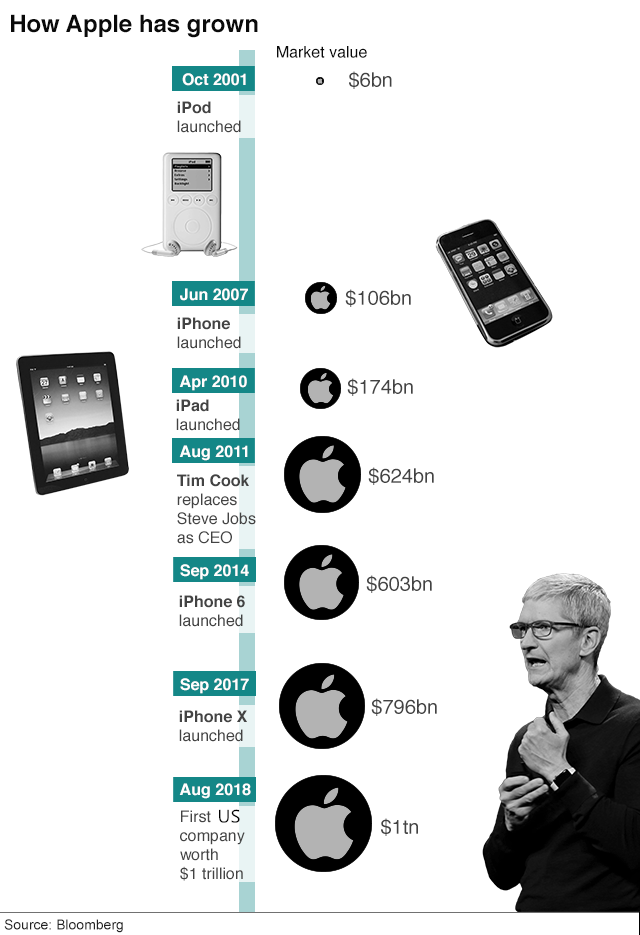
Apple has become the first US company with a market cap of over $1 trillion. This follows a jump in its stock after reporting strong Q3 earnings that saw the iPhone maker surpass both its own projections and analysts’ estimates, while also making a strong forecast for its upcoming Q4 earnings.


Apple hit the $1 trillion mark early this morning when its stock crossed $207.05 per share at 11:48am ET (the stock has since dropped back down slightly). Given the volatile nature of the market, however, it’s possible Apple may not stay a $1 trillion company for very long, or it could bounce back and forth over the $1 trillion mark in the coming days. It technically also isn’t the first to hit $1 trillion, either — PetroChina briefly reached $1 trillion back in 2007, although the stock soon fell below that mark.


But for all intents and purposes, Apple is the first US-based (and, for now, the only) trillion-dollar company on the market. It likely won’t be there alone for long, though: Amazon is also on the verge of hitting the $1 trillion mark after its own positive Q3 results.


Of course, all of this is an arbitrary milestone based on humans’ general tendency to put more weight on nice-looking round numbers as some kind of goal. There’s really no practical difference between Apple’s worth of $999 billion and $1 trillion since it’s still an almost impossibly wealthy and influential company beyond the comprehension of individual people.


Source: the verge

Windows
Mac OS
iOS
Linux
3uTools
Win 64-bit For this device
V9.01 2025-12-27
Download
Win 32-bit For this device
V9.01 2025-12-27
Download
3uTools
Intel Chip How to Identify Chip Type
V9.0 2025-12-02
Download
Apple Silicon
V9.0 2025-12-02
Download
How to Identify Chip Type
1.  Click the Apple icon in the top-left corner of the screen and select About This Mac.
2.  Check the Processor or Chip field to determine if it is "Intel" or "Apple".
Please use the 3uTools PC client to install the iOS client:
1、 Install either the Windows or Mac version of 3uTools on your computer
2、 Open the PC client and connect your device to the computer via USB cable
3、 After the connection is successful, wait for the computer to automatically install the mobile app for the device, or locate “Install Mobile App” on the computer and manually click to install.
3uTools
deb file
V3.01 2025-11-20
Download
rpm file
V3.01 2025-11-20
Download
Windows
Windows
iOS
iOS
Android
Android
TV
TV
3uAirPlayer
Win 64-bit For this device
V6.0.2 2025-11-19
Download
Win 32-bit For this device
V6.0.2 2025-11-19
Download
iOS Device Mirroring (No App Required)
1、 Install 3uAirPlayer on the Windows PC
2、 Open Control Center and select Screen Mirroring
3、 From the list, choose your PC to start mirroring
4、 Or connect your iOS device to the PC via USB to begin mirroring
Scan to get "3uAirPlayer" App
3uAirPlayer TV V1.0.18
2025-11-28
TV System Requirements: Android 7.0 or later
Download the TV installation package, copy it to a USB drive, insert it into your TV or set-top box, then select the file from the home screen to install.