
NEWS

Apple Adds Indoor Maps for Airports in Berlin, London, Geneva & Amsterdam

12/01/2017

3959

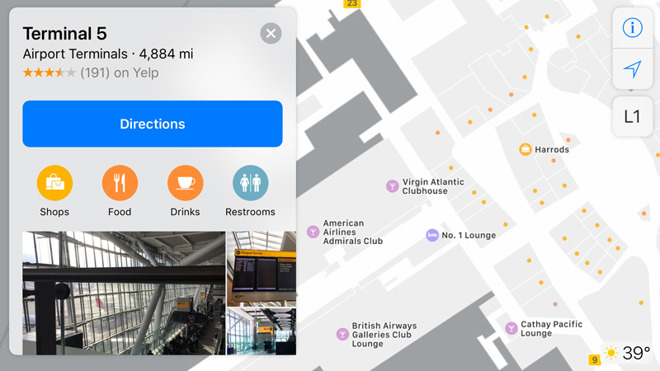
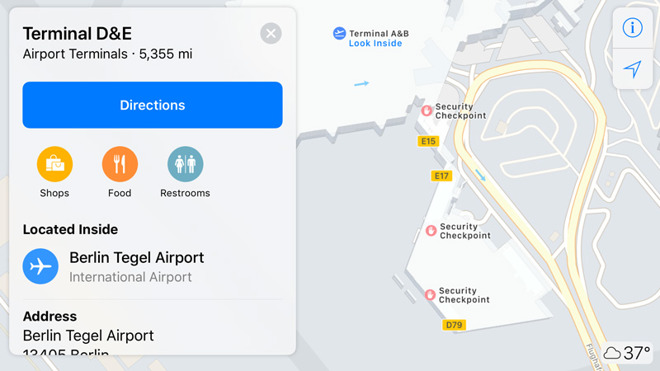
Apple has added detailed indoor coverage to several European airports in Apple Maps, including Berlin's Tegel and Schoenefeld, London's Heathrow and Gatwick, Amsterdam's Schiphol, and Geneva in Switzerland.


Travelers can use their iPhone to find things like gates, baggage, bathrooms, security checkpoints, and various shops and restaurants. Only some of these items are visible on a paired Apple Watch, however.
Apple Adds Indoor Maps for Airports in Berlin, London, Geneva & Amsterdam


Apple has been gradually adding airport maps since this summer's iOS 11 betas. Until recently the company was concentrating on the U.S., adding terminals in cities like Chicago, Miami, Las Vegas, and San Jose.

Apple Adds Indoor Maps for Airports in Berlin, London, Geneva & Amsterdam


More airports have been promised, but major hubs like New York's JFK and Toronto's Pearson still have only partial details.


Source: appleinsider

Windows
Mac OS
iOS
Linux
3uTools
Win 64-bit For this device
V9.0 2025-11-11
Download
Win 32-bit For this device
V9.0 2025-11-11
Download
3uTools
Intel Chip How to Identify Chip Type
V9.0 2025-12-02
Download
Apple Chip
V9.0 2025-12-02
Download
How to Identify Chip Type
1.  Click the Apple icon in the top-left corner of the screen and select About This Mac.
2.  Check the Processor or Chip field to determine if it is "Intel" or "Apple".
Please use the 3uTools PC client to install the iOS client:
1、 Install either the Windows or Mac version of 3uTools on your computer
2、 Open the PC client and connect your device to the computer via USB cable
3、 After the connection is successful, wait for the computer to automatically install the mobile app for the device, or locate “Install Mobile App” on the computer and manually click to install.
3uTools
deb file
V3.01 2025-11-20
Download
rpm file
V3.01 2025-11-20
Download
Windows
Windows
iOS
iOS
Android
Android
TV
TV
3uAirPlayer
Win 64-bit For this device
V6.0.2 2025-11-19
Download
Win 32-bit For this device
V6.0.2 2025-11-19
Download
iOS Device Mirroring (No App Required)
1、 Install 3uAirPlayer on the Windows PC
2、 Open Control Center and select Screen Mirroring
3、 From the list, choose your PC to start mirroring
4、 Or connect your iOS device to the PC via USB to begin mirroring
Scan to get "3uAirPlayer" App
3uAirPlayer TV V1.0.18
2025-11-28
TV System Requirements: Android 7.0 or later
Download the TV installation package, copy it to a USB drive, insert it into your TV or set-top box, then select the file from the home screen to install.




