
NEWS

Apple’s iPhone 8 Design Blueprints Show Camera/3D Sensors ‘Under’ The Device’s Screen

06/01/2017

4089

It’s a weird day for iPhone leaks. We’ve got two leaks for you, from the same source. You can take a look at the first one here. It confirms the vertical dual camera setup but doesn’t show an additional sensor at the device’s front. Now, another set of images show the latter feature. It’s surprising since their source is highly credible, one that I’ve been personally following over the years. Take a look below to find out more.
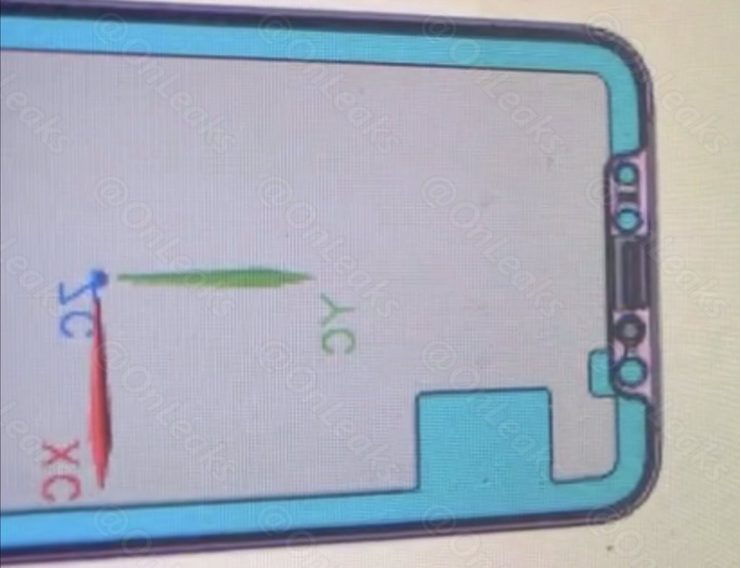

Apple’s iPhone 8 Design Blueprints Show Camera/3D Sensors ‘Under’ The Device’s Screen


When we talk about rumors, there are a lot floating around for the iPhone 8. The device is perhaps the most highly anticipated smartphone from Apple’s end in recent years. The company isn’t able to churn out game changing products since the death of Steve Jobs. All that it has been able to do is give us an Apple watch, some iPad upgrades and incremental additions to the lineup. Not that these aren’t impressive in their own end. The DCI-P3 gamut for the iPad and the iPhone 7’s custom ISP are things only Apple can pull off with its laser focus on device functionality.


Today, we’ve got some very interesting iPhone 8 drawings for you. At the face of it, they appear to be no different from the link shared at the start of this post. But, take a closer look and you’ll see something very interesting. Earlier on in this year’s iPhone 8 leak cycle, Venya Geskin share some factory drawings for the smartphone. They showed multiple sensors at its front, hinting towards possible facial recognition that was also suggested by KGI’s famed Ming-Chi Kuo.


Source: wccftech

Windows
Mac OS
iOS
Linux
3uTools
Win 64-bit For this device
V9.0 2025-11-11
Download
Win 32-bit For this device
V9.0 2025-11-11
Download
3uTools
Intel Chip How to Identify Chip Type
V9.0 2025-12-02
Download
Apple Silicon
V9.0 2025-12-02
Download
How to Identify Chip Type
1.  Click the Apple icon in the top-left corner of the screen and select About This Mac.
2.  Check the Processor or Chip field to determine if it is "Intel" or "Apple".
Please use the 3uTools PC client to install the iOS client:
1、 Install either the Windows or Mac version of 3uTools on your computer
2、 Open the PC client and connect your device to the computer via USB cable
3、 After the connection is successful, wait for the computer to automatically install the mobile app for the device, or locate “Install Mobile App” on the computer and manually click to install.
3uTools
deb file
V3.01 2025-11-20
Download
rpm file
V3.01 2025-11-20
Download
Windows
Windows
iOS
iOS
Android
Android
TV
TV
3uAirPlayer
Win 64-bit For this device
V6.0.2 2025-11-19
Download
Win 32-bit For this device
V6.0.2 2025-11-19
Download
iOS Device Mirroring (No App Required)
1、 Install 3uAirPlayer on the Windows PC
2、 Open Control Center and select Screen Mirroring
3、 From the list, choose your PC to start mirroring
4、 Or connect your iOS device to the PC via USB to begin mirroring
Scan to get "3uAirPlayer" App
3uAirPlayer TV V1.0.18
2025-11-28
TV System Requirements: Android 7.0 or later
Download the TV installation package, copy it to a USB drive, insert it into your TV or set-top box, then select the file from the home screen to install.




