
NEWS

WWDC App Updated with New Design and Features

05/31/2017

4035

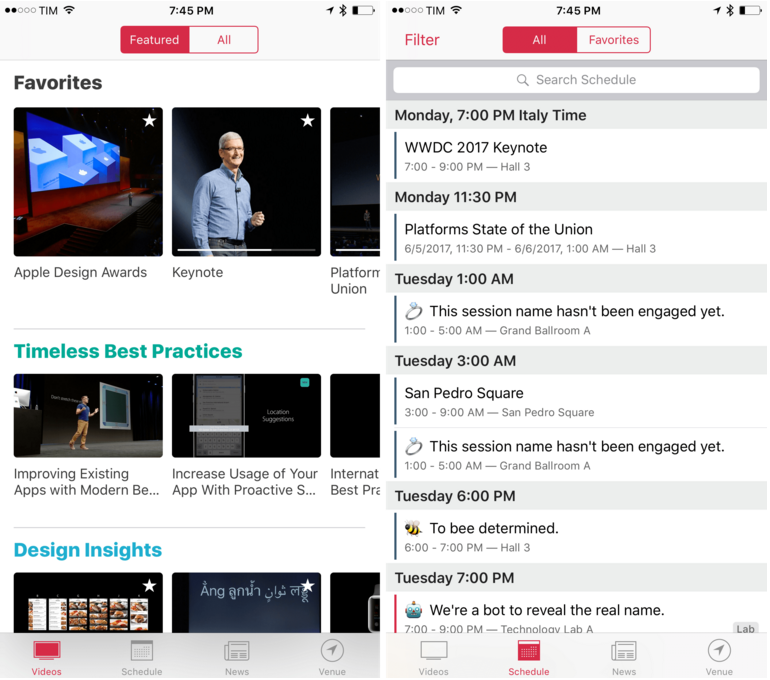
Apple has updated the WWDC app ahead of its annual developer conference that begins June 5, 2017 in San Jose, California. The app has an all-new design this year. In 2016, the UI was dominated by dark tones causing speculation that it was a precursor to a system-wide dark mode that didn’t materialize. This year’s update shares some of the same design language as the Apple Music and News apps.

WWDC App Updated with New Design and Features


In addition to the refreshed design, Apple has added curated video playlists focused on themes like Developing for iPad, interactive maps of the WWDC venue and surrounding area, for the first time, the ability to use of all of the app's features without signing into a developer account, and a new ‘Venue’ tab. Apple is also making a podcast studio available as part of WWDC for attendees who need a space to record shows.


Though not mentioned in the release notes, the WWDC app has a little surprise in store in the form of iMessage stickers. The set includes 17 colorful cartoon-style images with an assortment of classic Apple iconography, logos for Metal and Swift, and more.


Source: macstories

Windows
Mac OS
iOS
Linux
3uTools
Win 64-bit For this device
V9.0 2025-11-11
Download
Win 32-bit For this device
V9.0 2025-11-11
Download
3uTools
Intel Chip How to Identify Chip Type
V9.0 2025-12-02
Download
Apple Chip
V9.0 2025-12-02
Download
How to Identify Chip Type
1.  Click the Apple icon in the top-left corner of the screen and select About This Mac.
2.  Check the Processor or Chip field to determine if it is "Intel" or "Apple".
Please use the 3uTools PC client to install the iOS client:
1、 Install either the Windows or Mac version of 3uTools on your computer
2、 Open the PC client and connect your device to the computer via USB cable
3、 After the connection is successful, wait for the computer to automatically install the mobile app for the device, or locate “Install Mobile App” on the computer and manually click to install.
3uTools
deb file
V3.01 2025-11-20
Download
rpm file
V3.01 2025-11-20
Download
Windows
Windows
iOS
iOS
Android
Android
TV
TV
3uAirPlayer
Win 64-bit For this device
V6.0.2 2025-11-19
Download
Win 32-bit For this device
V6.0.2 2025-11-19
Download
iOS Device Mirroring (No App Required)
1、 Install 3uAirPlayer on the Windows PC
2、 Open Control Center and select Screen Mirroring
3、 From the list, choose your PC to start mirroring
4、 Or connect your iOS device to the PC via USB to begin mirroring
Scan to get "3uAirPlayer" App
3uAirPlayer TV V1.0.18
2025-11-28
TV System Requirements: Android 7.0 or later
Download the TV installation package, copy it to a USB drive, insert it into your TV or set-top box, then select the file from the home screen to install.




