 NEWS
NEWS
Apple Promotes Third-Party Gatherings on Dedicated 'Beyond WWDC' Page
 05/17/2017
 4112
4112
Apple is highlight alternative events taking place alongside its annual Worldwide Developers Conference, with the developer resources page revealing when and where third-party gatherings are taking place in relation to the McEnery Convention Center, the venue of WWDC itself in San Jose.
At the top of the "Beyond WWDC" page is a map showing the locations of the unofficial WWDC events in the local area, complete with clickable icons providing more details about what is happening at each venue. Below the map is a schedule, listing a number of the third-party events that developers visiting WWDC may want to check out over the course of the week, from June 5 to June 8
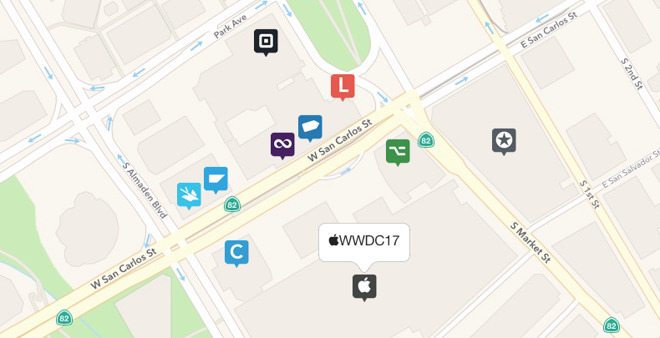
So far, there are nine alternative events on the list, with a brief description of each, the venue, and the days in the week it will be taking place, but Apple does advise it will be "adding more events" to the list soon. A few of the items are conferences in their own right, including the CocoaConf Next Door, the AltConf 2017, and Layers, which all take place across most of the week.
A few of the listings are for corporate sponsored events, with Swift@IBM, SAP CodeJam, and iOS Engineering with Square providing workshops and discussions for using tools and services each company provides with developer's own apps.
Of the remainder, the Beard Bash 2017 on the Monday and James Dempsey and the Breakpoints on the Wednesday are musical events, with the latter also a benefit concert for App Camp for Girls. Lastly, The Talk Show with John Gruber Live on the Tuesday sees the Daring Fireball columnist and podcaster discussing technology and design trends with an audience.
Running through the week until June 9, WWDC is expected to be the launch venue for iOS 11, MacOS 10.13, tvOS 11, and watchOS 4. While a developer-focused event, Apple is also thought to be preparing to launch an upgrade to the iPad Pro range, new MacBooks, and possibly a rumored Siri standalone home speaker.
Source: appleinsider










