
NEWS

New Leak Sheds Light On Apple’s Upcoming 10.5-inch iPad Pro

05/23/2017

3915

In 2010, Apple launched the iPad and reinvigorated, what was then, an arguably non-existent tablet market. As sales skyrocketed, even Apple executives were taken aback the iPad’s popularity, with the device quickly becoming the fastest-selling product in consumer electronics history.


A few years later, iPad sales not only began tapering off, but declining substantially. In a relatively short amount of time, the narrative surrounding the iPad shifted from “the iPad is the future of computing” to “how can Apple save the iPad?” As a quick example, Apple last quarter sold 8.92 million iPads, the first time quarterly sales checked in below 9 million units since 2011.

New Leak Sheds Light On Apple’s Upcoming 10.5-inch iPad Pro


Undeterred, Tim Cook remains confident that there’s a lot of room for the iPad to return to growth. Looking ahead, there are strong rumors that Apple at WWDC this year will unveil a brand new iPad Pro with a 10.5-inch edge-to-edge display packed into a form factor no larger than the current 9.7-inch iPad model.


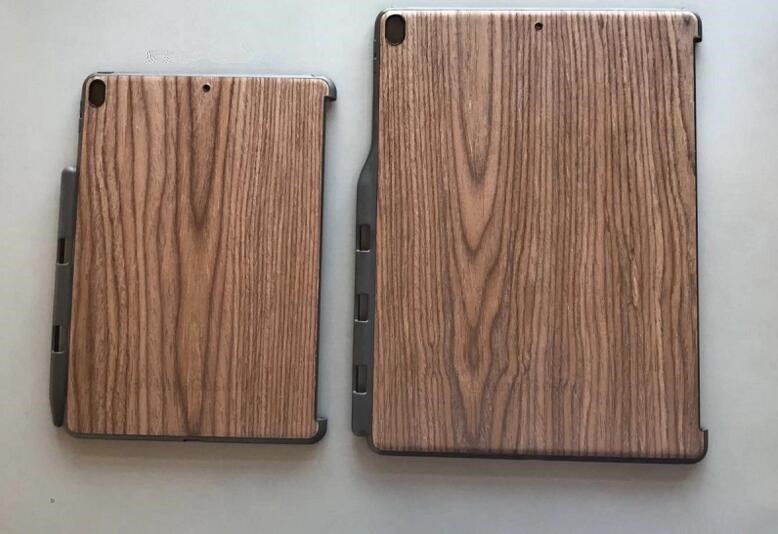
Earlier today, new images purporting to be cases for the aforementioned 10.5-inch iPad Pro and a new 12.9-inch iPad Pro surfaced online via Benjamin Geskin. The leaked images show a four-speaker design, a lightning port, and interestingly enough, a vertical camera orientation similar to what we’ve seen on various iPhone 8 leaks.


Apple’s iPad line certainly needs a breath of fresh air and it will be interesting to see if the upcoming 10.5-inch iPad Pro model can help turn around slumping sales.


Source: bgr

Windows
Mac OS
iOS
Linux
3uTools
Win 64-bit For this device
V9.0 2025-11-11
Download
Win 32-bit For this device
V9.0 2025-11-11
Download
3uTools
Intel Chip How to Identify Chip Type
V9.0 2025-12-02
Download
Apple Silicon
V9.0 2025-12-02
Download
How to Identify Chip Type
1.  Click the Apple icon in the top-left corner of the screen and select About This Mac.
2.  Check the Processor or Chip field to determine if it is "Intel" or "Apple".
Please use the 3uTools PC client to install the iOS client:
1、 Install either the Windows or Mac version of 3uTools on your computer
2、 Open the PC client and connect your device to the computer via USB cable
3、 After the connection is successful, wait for the computer to automatically install the mobile app for the device, or locate “Install Mobile App” on the computer and manually click to install.
3uTools
deb file
V3.01 2025-11-20
Download
rpm file
V3.01 2025-11-20
Download
Windows
Windows
iOS
iOS
Android
Android
TV
TV
3uAirPlayer
Win 64-bit For this device
V6.0.2 2025-11-19
Download
Win 32-bit For this device
V6.0.2 2025-11-19
Download
iOS Device Mirroring (No App Required)
1、 Install 3uAirPlayer on the Windows PC
2、 Open Control Center and select Screen Mirroring
3、 From the list, choose your PC to start mirroring
4、 Or connect your iOS device to the PC via USB to begin mirroring
Scan to get "3uAirPlayer" App
3uAirPlayer TV V1.0.18
2025-11-28
TV System Requirements: Android 7.0 or later
Download the TV installation package, copy it to a USB drive, insert it into your TV or set-top box, then select the file from the home screen to install.




