
NEWS

Apple's Glass Cube on Fifth Avenue to Be Removed

05/10/2017

3967

The glass cube at Apple’s Fifth Avenue flagship store will be taken down as the store undergoes a major expansion, according to city records and a source familiar with the plans.


The Department of Buildings approved an application for the “full removal” of the cube, expected to cost $2 million, on April 17. The application was submitted in mid-March.


It’s unclear when the cube will be taken down, whether it will be altered in any way or when it will return. 
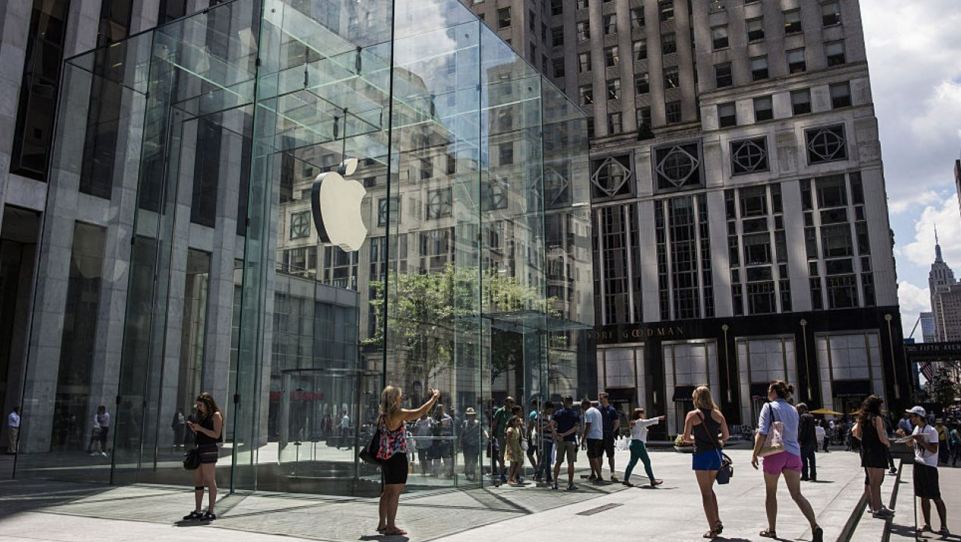

Apple's Glass Cube on Fifth Avenue to Be Removed


The Apple store will be expanded from 32,000 to 77,000 square feet. That work has already started.


The store was temorarily relocated earlier this year to the former FAO Schwarz space at 767 Fifth Ave., where it will remain until the work is completed, according to Apple. It's unclear when the expanded store will open.


Apple did not have a comment on the removal of the cube, but said in a statement that it looks "forward to creating an incredible new Apple Fifth Avenue, where our customers will enjoy new services and experiences in a much larger space."


Boston Properties, the company that owns the General Motors building where the store is located, did not immediately respond to a request for comment.


Source: amny


Windows
Mac OS
iOS
Linux
3uTools
Win 64-bit For this device
V9.0 2025-11-11
Download
Win 32-bit For this device
V9.0 2025-11-11
Download
3uTools
Intel Chip How to Identify Chip Type
V9.0 2025-12-02
Download
Apple Silicon
V9.0 2025-12-02
Download
How to Identify Chip Type
1.  Click the Apple icon in the top-left corner of the screen and select About This Mac.
2.  Check the Processor or Chip field to determine if it is "Intel" or "Apple".
Please use the 3uTools PC client to install the iOS client:
1、 Install either the Windows or Mac version of 3uTools on your computer
2、 Open the PC client and connect your device to the computer via USB cable
3、 After the connection is successful, wait for the computer to automatically install the mobile app for the device, or locate “Install Mobile App” on the computer and manually click to install.
3uTools
deb file
V3.01 2025-11-20
Download
rpm file
V3.01 2025-11-20
Download
Windows
Windows
iOS
iOS
Android
Android
TV
TV
3uAirPlayer
Win 64-bit For this device
V6.0.2 2025-11-19
Download
Win 32-bit For this device
V6.0.2 2025-11-19
Download
iOS Device Mirroring (No App Required)
1、 Install 3uAirPlayer on the Windows PC
2、 Open Control Center and select Screen Mirroring
3、 From the list, choose your PC to start mirroring
4、 Or connect your iOS device to the PC via USB to begin mirroring
Scan to get "3uAirPlayer" App
3uAirPlayer TV V1.0.18
2025-11-28
TV System Requirements: Android 7.0 or later
Download the TV installation package, copy it to a USB drive, insert it into your TV or set-top box, then select the file from the home screen to install.




