NEWS

Apple Watch Nike Sport Band Now Sold Separately For $49

03/22/2017

3601

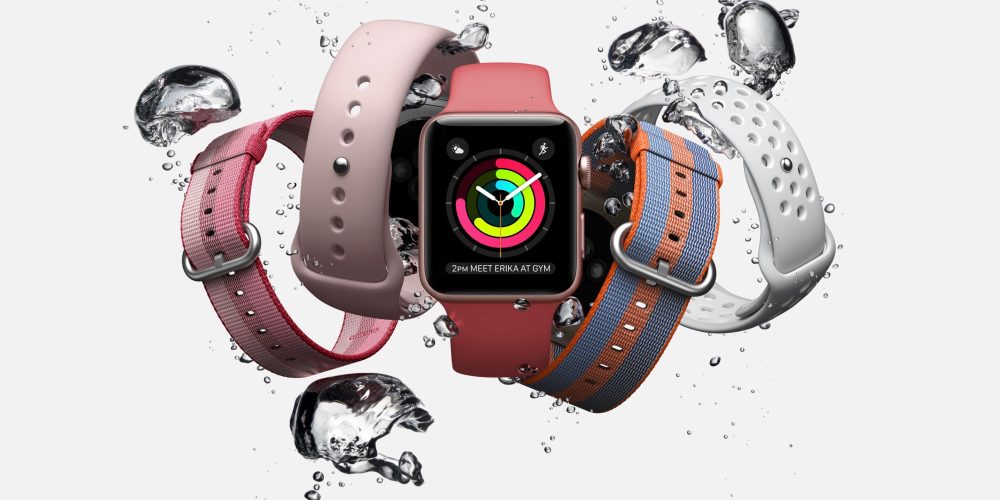
New seasonal bands for the Apple Watch are available in a range of colors, as well as the Nike Sport Band, which can now be purchased separately without the special Nike edition of the Apple Watch.

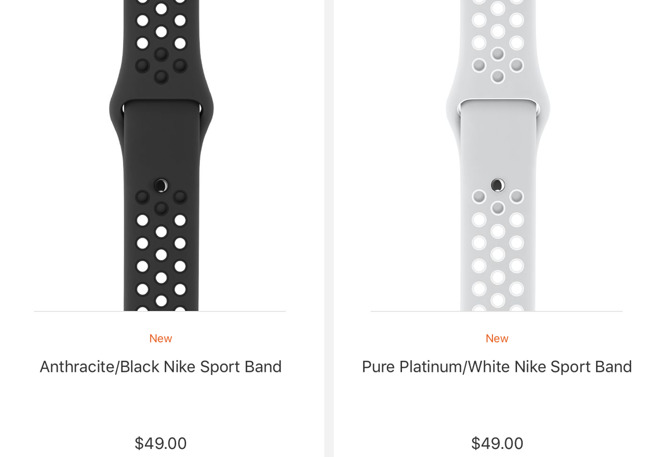
Nike's lightweight, perforated sport bands are priced at $49 and come in colors of black/volt, anthracite/black, and pure platinum/white. AppleInsider reviewed the Apple Watch Nike+ in Decemberand found that the previously-exclusive sport band had a funky look but a practical purpose for athletes.
Apple Watch Nike Sport Band Now Sold Separately For $49


But rather than buy an entirely new $369 watch just to get the Nike Band, customers can now buy the band separately for a much more affordable price. 

In addition, Apple also launched regular $49 sport bands in three new colors:


  • Camellia Sport Band

  • Pebble Sport Band

  • Azure Sport Band


Apple Watch Nike Sport Band Now Sold Separately For $49


Woven nylon bands also gain six new spring colors, priced at $49:

  • Orange Woven Nylon

  • Berry Woven Nylon

  • Red Woven Nylon

  • Pollen Woven Nylon

  • Tahoe Blue Woven Nylon

  • Midnight Blue Woven Nylon


In addition, the $149 classic leather design was also updated with these new options:

  • Saddle Brown Classic Buckle

  • Berry Classic Buckle

  • Taupe Classic Buckle

  • Sapphire Classic Buckle

  • Red Classic Buckle

  • Midnight Blue Classic Buckle

  • Black Classic Buckle


Finally, the Hermès Leather collection also gained two new styles. Priced at $489 apiece, they are:

  • Apple Watch Hermès Fauve Barenia Leather Double Tour

  • Apple Watch Hermès Bleu Zéphyr Epsom Leather Double Tour


Source: appleinsider

Windows
Mac OS
iOS
Linux
3uTools
Win 64-bit For this device
V9.0 2025-11-11
Download
Win 32-bit For this device
V9.0 2025-11-11
Download
3uTools
Intel Chip How to Identify Chip Type
V9.0 2025-12-02
Download
Apple Silicon
V9.0 2025-12-02
Download
How to Identify Chip Type
1.  Click the Apple icon in the top-left corner of the screen and select About This Mac.
2.  Check the Processor or Chip field to determine if it is "Intel" or "Apple".
Please use the 3uTools PC client to install the iOS client:
1、 Install either the Windows or Mac version of 3uTools on your computer
2、 Open the PC client and connect your device to the computer via USB cable
3、 After the connection is successful, wait for the computer to automatically install the mobile app for the device, or locate “Install Mobile App” on the computer and manually click to install.
3uTools
deb file
V3.01 2025-11-20
Download
rpm file
V3.01 2025-11-20
Download
Windows
Windows
iOS
iOS
Android
Android
TV
TV
3uAirPlayer
Win 64-bit For this device
V6.0.2 2025-11-19
Download
Win 32-bit For this device
V6.0.2 2025-11-19
Download
iOS Device Mirroring (No App Required)
1、 Install 3uAirPlayer on the Windows PC
2、 Open Control Center and select Screen Mirroring
3、 From the list, choose your PC to start mirroring
4、 Or connect your iOS device to the PC via USB to begin mirroring
Scan to get "3uAirPlayer" App
3uAirPlayer TV V1.0.18
2025-11-28
TV System Requirements: Android 7.0 or later
Download the TV installation package, copy it to a USB drive, insert it into your TV or set-top box, then select the file from the home screen to install.