
NEWS

Steve Jobs Autographed NexTWORLD Poster

03/07/2017

3576

Here's your chance to get something autographed by Steve Jobs, but you’ll need to bring your wallet. An auction for a NeXTWORLD poster autographed by Steve Jobs currently has 31 bids and stands at US$11,000. The poster, which was autographed by Steve Jobs in 1992, is part of an online auction by RR Auction. Bidding ends on March 8th.


Below is the poster—Steve Jobs’s autograph is in the top border.


NeXTWORLD was the name of a NeXT-centric trade show, and this poster was made to promote the inaugural event held from January 22nd, 1992 to January 24th at San Francisco’s Civic Auditorium and Brooks Hall.


According to the auction house, “The consignor of this piece worked for Canon USA and was demonstrating the NeXT computers in a booth at the expo; Jobs signed this poster in person just before the show opened.”
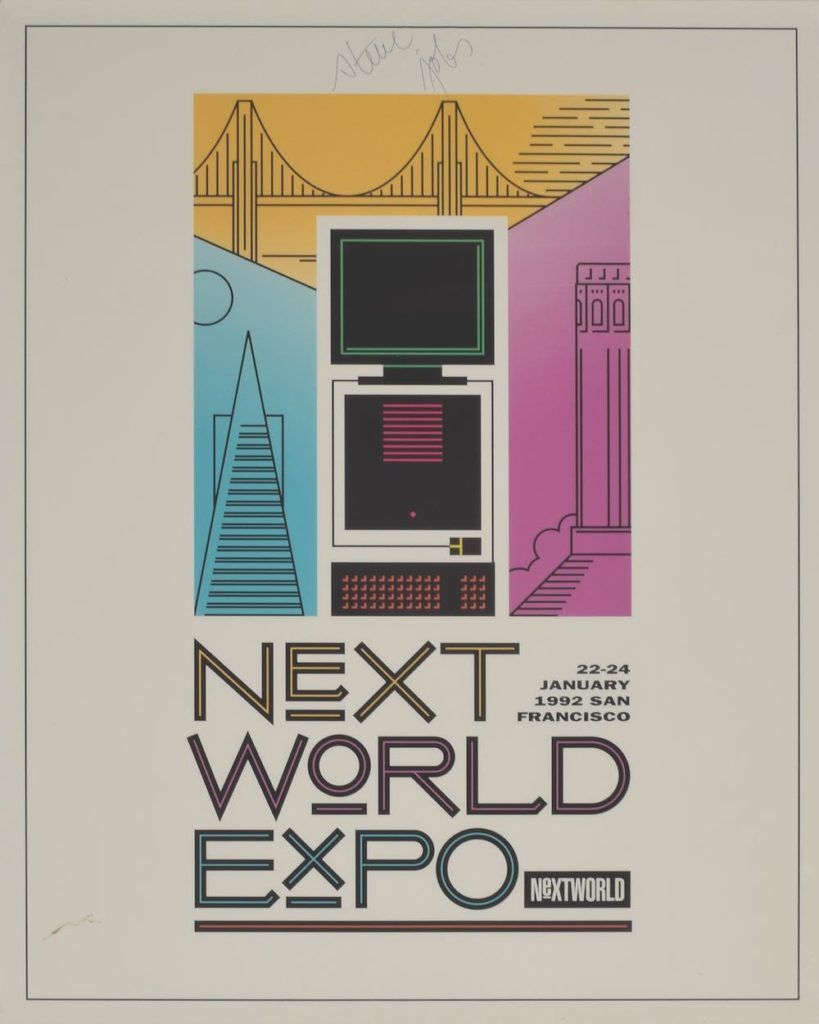

Steve Jobs Autographed NexTWORLD Poster


Steve Jobs would most likely be appalled that his signature would be collectible, but such is the nature of a human being’s legacy. It’s in the hands of his or her survivors. And it turns out there are a lot of folks who admired this particular human being.


Only thing is he didn’t often autograph…anything. I can’t recall another non-contract with his signature on it coming up for auction. That’s one reason RR Auction is estimating this poster will top $20,000.


This auction ends at 5:00 PM PST on March 8th.


Source: macboserver

Windows
Mac OS
iOS
Linux
3uTools
Win 64-bit For this device
V9.0 2025-11-11
Download
Win 32-bit For this device
V9.0 2025-11-11
Download
3uTools
Intel Chip How to Identify Chip Type
V9.0 2025-12-02
Download
Apple Chip
V9.0 2025-12-02
Download
How to Identify Chip Type
1.  Click the Apple icon in the top-left corner of the screen and select About This Mac.
2.  Check the Processor or Chip field to determine if it is "Intel" or "Apple".
Please use the 3uTools PC client to install the iOS client:
1、 Install either the Windows or Mac version of 3uTools on your computer
2、 Open the PC client and connect your device to the computer via USB cable
3、 After the connection is successful, wait for the computer to automatically install the mobile app for the device, or locate “Install Mobile App” on the computer and manually click to install.
3uTools
deb file
V3.01 2025-11-20
Download
rpm file
V3.01 2025-11-20
Download
Windows
Windows
iOS
iOS
Android
Android
TV
TV
3uAirPlayer
Win 64-bit For this device
V6.0.2 2025-11-19
Download
Win 32-bit For this device
V6.0.2 2025-11-19
Download
iOS Device Mirroring (No App Required)
1、 Install 3uAirPlayer on the Windows PC
2、 Open Control Center and select Screen Mirroring
3、 From the list, choose your PC to start mirroring
4、 Or connect your iOS device to the PC via USB to begin mirroring
Scan to get "3uAirPlayer" App
3uAirPlayer TV V1.0.18
2025-11-28
TV System Requirements: Android 7.0 or later
Download the TV installation package, copy it to a USB drive, insert it into your TV or set-top box, then select the file from the home screen to install.




