NEWS

US Appeals Court Reopens Apple v. Samsung iPhone Design Suit in Wake of Supreme Court Ruling

01/14/2017

3755

US Appeals Court Reopens Apple v. Samsung iPhone Design Suit in Wake of Supreme Court Ruling


The court has reinstated Samsung's appeal in a single-paragraph order, and simultaneously tossed a ruling ordering the Korean company to pay Apple $399 million, Law360 said late on Thursday. It will now be up to the Federal Circuit to decide how much Samsung actually owes.

In early December, the Supreme Court 
sided with Samsung's position that a company can't be forced to pay the whole profits from an infringing device when only some components are violating patents. Samsung previously likened this to surrendering the whole profits from a car because of an infringing cupholder.

The core lawsuit has been in progress for over five years, specifically charging Samsung with copying the original iPhone's design, pointing to elements like bezels and home screen layouts. While Apple 
won a court victory in 2012 awarding it over $1 billion in damages, that amount came down dramatically in subsequent retrials. 

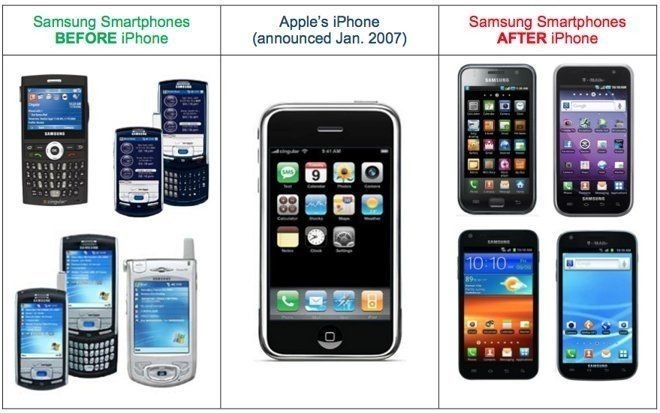
After the original iPhone was released in 2007, Samsung quickly adapted the look and functions of its own phones, taking on similar aesthetics and switching to a touch-based interface.

Apple's eventual lawsuit, however, was believed to be as much about Google's Android, the OS behind most Samsung devices. Former Apple Chief Steve Jobs considered Android "stolen," and threatened to go to "thermonuclear war" over the issue. Under Tim Cook, Apple has gradually wound down most Android-related legal actions.


Source: appleinsider

Windows
Mac OS
iOS
Linux
3uTools
Win 64-bit For this device
V9.0 2025-11-11
Download
Win 32-bit For this device
V9.0 2025-11-11
Download
3uTools
Intel Chip How to Identify Chip Type
V9.0 2025-12-02
Download
Apple Chip
V9.0 2025-12-02
Download
How to Identify Chip Type
1.  Click the Apple icon in the top-left corner of the screen and select About This Mac.
2.  Check the Processor or Chip field to determine if it is "Intel" or "Apple".
Please use the 3uTools PC client to install the iOS client:
1、 Install either the Windows or Mac version of 3uTools on your computer
2、 Open the PC client and connect your device to the computer via USB cable
3、 After the connection is successful, wait for the computer to automatically install the mobile app for the device, or locate “Install Mobile App” on the computer and manually click to install.
3uTools
deb file
V3.01 2025-11-20
Download
rpm file
V3.01 2025-11-20
Download
Windows
Windows
iOS
iOS
Android
Android
TV
TV
3uAirPlayer
Win 64-bit For this device
V6.0.2 2025-11-19
Download
Win 32-bit For this device
V6.0.2 2025-11-19
Download
iOS Device Mirroring (No App Required)
1、 Install 3uAirPlayer on the Windows PC
2、 Open Control Center and select Screen Mirroring
3、 From the list, choose your PC to start mirroring
4、 Or connect your iOS device to the PC via USB to begin mirroring
Scan to get "3uAirPlayer" App
3uAirPlayer TV V1.0.18
2025-11-28
TV System Requirements: Android 7.0 or later
Download the TV installation package, copy it to a USB drive, insert it into your TV or set-top box, then select the file from the home screen to install.