NEWS

Snapchat for iPhone Adding Universal Search Bar to Speed Up Interactions

01/14/2017

3243

Snapchat for iPhone Adding Universal Search Bar to Speed Up Interactions


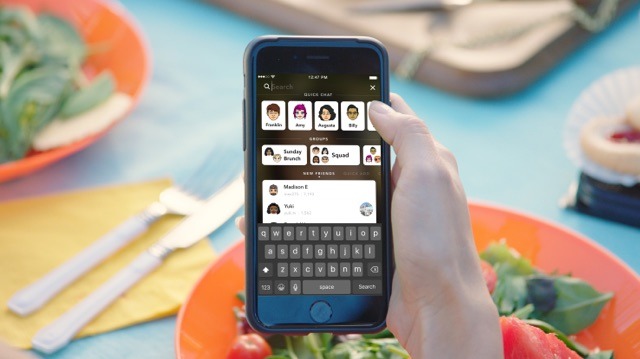
The new search bar sits at the top of the currently uncluttered swipe-based interface, Snapchat revealed to TechCrunch, with a tap of the bar bringing up a number of shortcuts to connect with other people across the entire screen. Displayed connections start with frequently accessed contacts in a Quick Chat row, with conversations in groups shown below. 

Below the two rows are three columns, covering users who have sent invitation requests, mutual friends with existing contacts, and other potential contacts. Tapping any of the cards on this screen will start a conversation with that user, while tapping and holding a card brings up a mini profile. 


For the search function itself, users are now able to find users by name and username, existing conversations between groups, and with Discover channels from Snapchat partners.

Search also works with Our Story, a feature that curates content based on events and holidays. As part of the same update, Snapchat is removing a restriction that limited what could be submitted, allowing for more minor events to be covered in the future by user submissions. 

So far, 
Snapchat has rolled out the new search to a small number of Android users, but intends bringing it to all iOS and Android users in the near future.


Source: appleinsider

Windows
Mac OS
iOS
Linux
3uTools
Win 64-bit For this device
V9.0 2025-11-11
Download
Win 32-bit For this device
V9.0 2025-11-11
Download
3uTools
Intel Chip How to Identify Chip Type
V9.0 2025-12-02
Download
Apple Chip
V9.0 2025-12-02
Download
How to Identify Chip Type
1.  Click the Apple icon in the top-left corner of the screen and select About This Mac.
2.  Check the Processor or Chip field to determine if it is "Intel" or "Apple".
Please use the 3uTools PC client to install the iOS client:
1、 Install either the Windows or Mac version of 3uTools on your computer
2、 Open the PC client and connect your device to the computer via USB cable
3、 After the connection is successful, wait for the computer to automatically install the mobile app for the device, or locate “Install Mobile App” on the computer and manually click to install.
3uTools
deb file
V3.01 2025-11-20
Download
rpm file
V3.01 2025-11-20
Download
Windows
Windows
iOS
iOS
Android
Android
TV
TV
3uAirPlayer
Win 64-bit For this device
V6.0.2 2025-11-19
Download
Win 32-bit For this device
V6.0.2 2025-11-19
Download
iOS Device Mirroring (No App Required)
1、 Install 3uAirPlayer on the Windows PC
2、 Open Control Center and select Screen Mirroring
3、 From the list, choose your PC to start mirroring
4、 Or connect your iOS device to the PC via USB to begin mirroring
Scan to get "3uAirPlayer" App
3uAirPlayer TV V1.0.18
2025-11-28
TV System Requirements: Android 7.0 or later
Download the TV installation package, copy it to a USB drive, insert it into your TV or set-top box, then select the file from the home screen to install.