NEWS

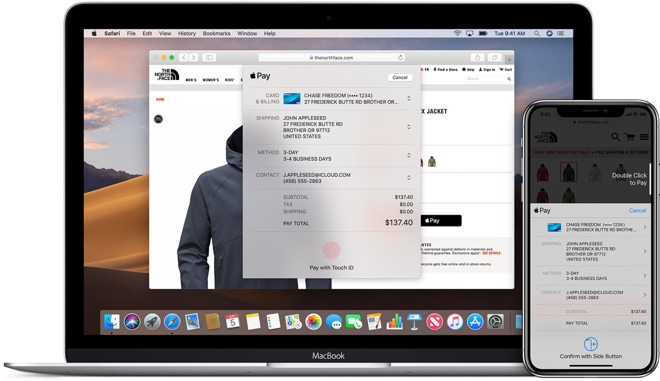
Apple Pay on the Web can now be used on StubHub with Safari on the iPad and iPhone

08/02/2019

2432

Apple Pay on the Web can now be used on StubHub with Safari on the iPad and iPhone


The addition was made, because StubHub is already seeing Apple Pay as a payment method for over 20% of purchases from inside the StubHub app. Other reasons cited are user privacy versus other options.

"We do anticipate that more fans will use Apple Pay for their ticket purchases," StubHub's Global Product and Communications Senior Manager Brad Glasser said in a statement regarding the addition "Now that the method is available on more platforms, we'll see an organic increase in traffic." 

Apple Pay on the Web wasn't an option in Safari for iOS prior to Thursday's expansion. It has been available for Mac users for some time.

Additionally, Fans will begin to see Apple Pay as an available payment option for MLB mobile web transactions on the iPhone this week. 

The Apple Pay platform as a whole launched in late 2014 as a service for both point-of-sale tap-to-pay transactions, as well as in-app purchases. It relies on Apple's Secure Enclave for credit card data, and it uses a tokenization system that helps to prevent credit card fraud.

Support for the Mac was added with the unveiling of Apple Pay on the Web in macOS Sierra.


Source: AppleInsider

Windows
Mac OS
iOS
Linux
3uTools
Win 64-bit For this device
V9.01 2025-12-27
Download
Win 32-bit For this device
V9.01 2025-12-27
Download
3uTools
Intel Chip How to Identify Chip Type
V9.01 2025-12-31
Download
Apple Silicon
V9.01 2025-12-31
Download
How to Identify Chip Type
1.  Click the Apple icon in the top-left corner of the screen and select About This Mac.
2.  Check the Processor or Chip field to determine if it is "Intel" or "Apple".
Please use the 3uTools PC client to install the iOS client:
1、 Install either the Windows or Mac version of 3uTools on your computer
2、 Open the PC client and connect your device to the computer via USB cable
3、 After the connection is successful, wait for the computer to automatically install the mobile app for the device, or locate “Install Mobile App” on the computer and manually click to install.
3uTools
deb file
V3.01 2025-11-20
Download
rpm file
V3.01 2025-11-20
Download
Windows
Windows
iOS
iOS
Android
Android
TV
TV
3uAirPlayer
Win 64-bit For this device
V6.0.2 2025-11-19
Download
Win 32-bit For this device
V6.0.2 2025-11-19
Download
iOS Device Mirroring (No App Required)
1、 Install 3uAirPlayer on the Windows PC
2、 Open Control Center and select Screen Mirroring
3、 From the list, choose your PC to start mirroring
4、 Or connect your iOS device to the PC via USB to begin mirroring
Scan to get "3uAirPlayer" App
3uAirPlayer TV V1.0.18
2025-11-28
TV System Requirements: Android 7.0 or later
Download the TV installation package, copy it to a USB drive, insert it into your TV or set-top box, then select the file from the home screen to install.