
NEWS

Kanex to Debut Portable Apple Watch Charger on CES 2017

12/30/2016

4087

Third-party vendor Kanex plans to expand its GoPower Apple Watch accessory lineup at CES next year with a new ultra-portable charger small enough to be carried comfortably on a keyring and a self-contained charging stand. 


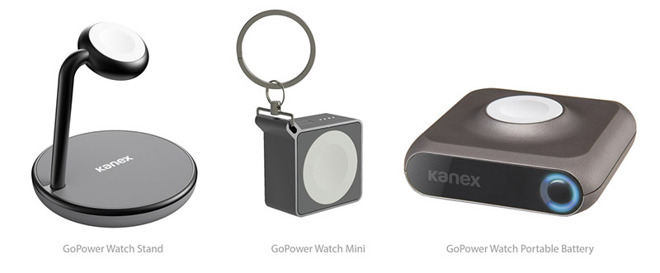
When it debuts at CES in January, the GoPower Watch Mini promises to be one of the smallest and most portable Apple MFi certified Apple Watch chargers on the market. 


Fitted into a chassis not much larger than Apple's magnetic inductive charging puck is a 1,000 mAh battery good for one full Apple Watch charge, a fuel gauge and built-in keychain loop for easy carry. Like wired chargers, the GoPower Watch Mini intelligently starts the charging process when its magnetic puck makes contact with an Apple Watch.


Kanex to Debut Portable Apple Watch Charger on CES 2017


Kanex is also bringing its own charging stand to market for Watch owners who have yet to find a suitable dock among the plethora of designs already available from other manufacturers. Dubbed the GoPower Watch Stand, the charger is powered by an included DC adapter and features an extra USB port for simultaneously juicing up an iPhone or iPad. 


At launch, the two new products will join Kanex's initial Apple Watch offering, the GoPower Watch portable battery. Armed with a 4,000 mAh internal battery and the same magnetic inductive technology as Apple's first-party chargers, the portable pack is good for up to six full charges. It also features a USB port for recharging other devices. 



Windows
Mac OS
iOS
Linux
3uTools
Win 64-bit For this device
V9.0 2025-11-11
Download
Win 32-bit For this device
V9.0 2025-11-11
Download
3uTools
Intel Chip How to Identify Chip Type
V9.0 2025-12-02
Download
Apple Chip
V9.0 2025-12-02
Download
How to Identify Chip Type
1.  Click the Apple icon in the top-left corner of the screen and select About This Mac.
2.  Check the Processor or Chip field to determine if it is "Intel" or "Apple".
Please use the 3uTools PC client to install the iOS client:
1、 Install either the Windows or Mac version of 3uTools on your computer
2、 Open the PC client and connect your device to the computer via USB cable
3、 After the connection is successful, wait for the computer to automatically install the mobile app for the device, or locate “Install Mobile App” on the computer and manually click to install.
3uTools
deb file
V3.01 2025-11-20
Download
rpm file
V3.01 2025-11-20
Download
Windows
Windows
iOS
iOS
Android
Android
TV
TV
3uAirPlayer
Win 64-bit For this device
V6.0.2 2025-11-19
Download
Win 32-bit For this device
V6.0.2 2025-11-19
Download
iOS Device Mirroring (No App Required)
1、 Install 3uAirPlayer on the Windows PC
2、 Open Control Center and select Screen Mirroring
3、 From the list, choose your PC to start mirroring
4、 Or connect your iOS device to the PC via USB to begin mirroring
Scan to get "3uAirPlayer" App
3uAirPlayer TV V1.0.18
2025-11-28
TV System Requirements: Android 7.0 or later
Download the TV installation package, copy it to a USB drive, insert it into your TV or set-top box, then select the file from the home screen to install.




