
NEWS

Apple Filing Shows Initial Stab at AirPods With Magnetic Hooks

12/30/2016

3429

An Apple patent application published on Thursday may hint at an abandoned AirPods design that aimed to keep the earbuds more firmly in place.


The patent describes a series of hooks that would not only attach around the ear but magnetically attract each other from opposite sides of the ear wall, preventing earbuds from falling out. Apple first submitted the idea in June.


It's not certain if the concept was born with the AirPods in mind —one diagram shows a conventional wired set of earbuds —but Apple's filing does mention wireless antenna assemblies.
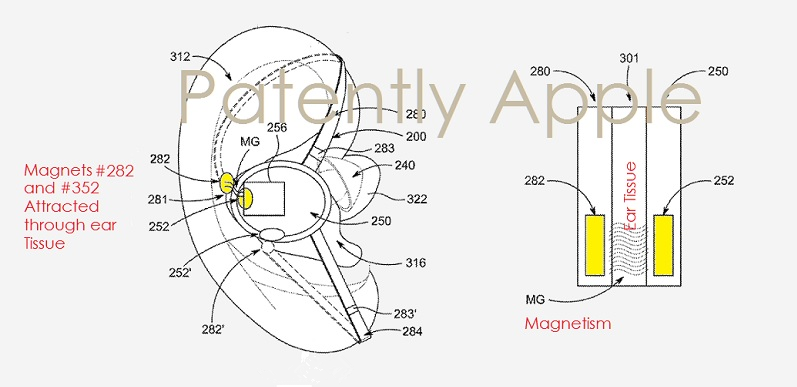

Apple Filing Shows Initial Stab at AirPods With Magnetic Hooks


Keeping AirPods in the ear has been a key concern of prospective buyers, though most initial tests suggest they are unlikely to fall out without a wire attached. Some third-party accessory makers are even selling add-on cables that keep them physically connected.


Conceivably, Apple may have decided against hooks for aesthetic reasons, simpler use, and/or making charging easier. In their final design the AirPods are charged by inserting them into a small battery case —something that wouldn't have worked with hooks in the way.


The company does use hooks in its Powerbeats line, but those are more consciously fitness-focused and originated prior to Apple's takeover of Beats in 2014.


Source : appleinsider

Windows
Mac OS
iOS
Linux
3uTools
Win 64-bit For this device
V9.0 2025-11-11
Download
Win 32-bit For this device
V9.0 2025-11-11
Download
3uTools
Intel Chip How to Identify Chip Type
V9.0 2025-12-02
Download
Apple Chip
V9.0 2025-12-02
Download
How to Identify Chip Type
1.  Click the Apple icon in the top-left corner of the screen and select About This Mac.
2.  Check the Processor or Chip field to determine if it is "Intel" or "Apple".
Please use the 3uTools PC client to install the iOS client:
1、 Install either the Windows or Mac version of 3uTools on your computer
2、 Open the PC client and connect your device to the computer via USB cable
3、 After the connection is successful, wait for the computer to automatically install the mobile app for the device, or locate “Install Mobile App” on the computer and manually click to install.
3uTools
deb file
V3.01 2025-11-20
Download
rpm file
V3.01 2025-11-20
Download
Windows
Windows
iOS
iOS
Android
Android
TV
TV
3uAirPlayer
Win 64-bit For this device
V6.0.2 2025-11-19
Download
Win 32-bit For this device
V6.0.2 2025-11-19
Download
iOS Device Mirroring (No App Required)
1、 Install 3uAirPlayer on the Windows PC
2、 Open Control Center and select Screen Mirroring
3、 From the list, choose your PC to start mirroring
4、 Or connect your iOS device to the PC via USB to begin mirroring
Scan to get "3uAirPlayer" App
3uAirPlayer TV V1.0.18
2025-11-28
TV System Requirements: Android 7.0 or later
Download the TV installation package, copy it to a USB drive, insert it into your TV or set-top box, then select the file from the home screen to install.




