NEWS

Apple’s iPhone is Still the ‘Dominant Device Brand’ Among American Teens

10/23/2018

2325

Apple’s iPhone is Still the ‘Dominant Device Brand’ Among American Teens


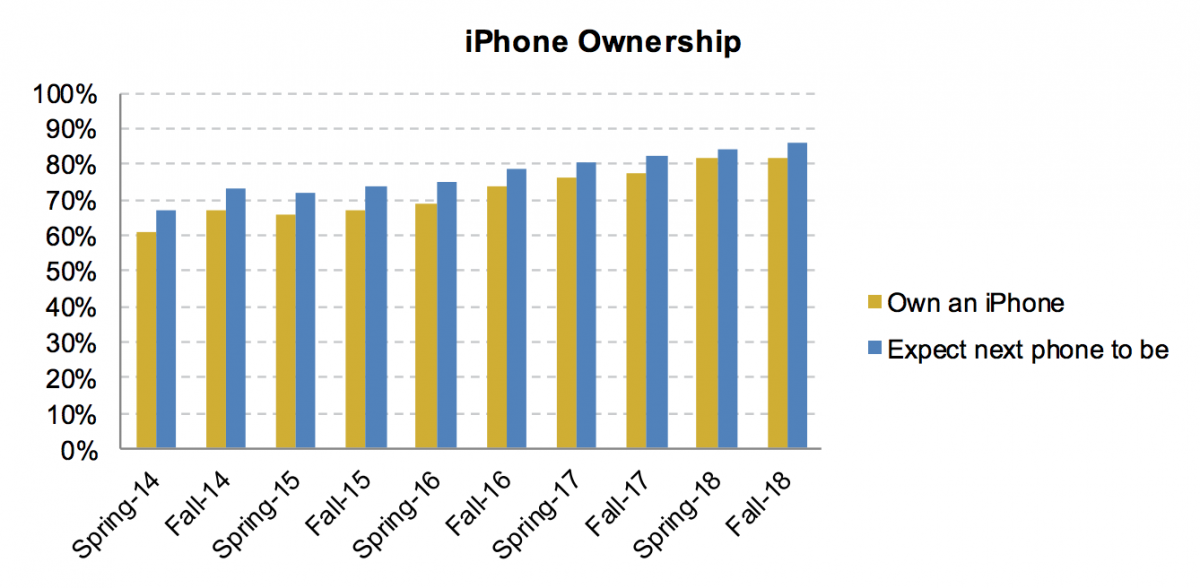
Teens in the United States still love the iPhone, with a whopping 82% of teens in a recent study saying they owned one of Apple’s phones.


But the study shows that Apple may even have more room to grow among American teens. Eighty-six percent of teens surveyed said they thought their next phone would be an iPhone.


Only 10% of teens surveyed said they planned to buy an Android phone next. And that was down from 11% in the spring, according to Piper Jaffray’s semiannual teens survey.


“Overall, we view the survey data as a sign that Apple’s place as the dominant device brand among teens remains intact,” Michael Olson and Yung Kim, the Piper Jaffray analysts, wrote.


The results were drawn from about 8,600 responses from teens across 48 states with an average age of 16.


Apple has been dominant among teens for the past five years, but Piper Jaffray says that the proportion of teens who intend to purchase a new iPhone is the highest it has ever seen.


The iPhone’s popularity may be boosting the Apple Watch. It’s the No. 2 most preferred watch brand – behind Rolex – with 17% of teens surveyed saying it’s their favorite watch brand.

Apple’s iPhone is Still the ‘Dominant Device Brand’ Among American Teens


Source: business insider

Windows
Mac OS
iOS
Linux
3uTools
Win 64-bit For this device
V9.01 2025-12-27
Download
Win 32-bit For this device
V9.01 2025-12-27
Download
3uTools
Intel Chip How to Identify Chip Type
V9.01 2025-12-31
Download
Apple Silicon
V9.01 2025-12-31
Download
How to Identify Chip Type
1.  Click the Apple icon in the top-left corner of the screen and select About This Mac.
2.  Check the Processor or Chip field to determine if it is "Intel" or "Apple".
Please use the 3uTools PC client to install the iOS client:
1、 Install either the Windows or Mac version of 3uTools on your computer
2、 Open the PC client and connect your device to the computer via USB cable
3、 After the connection is successful, wait for the computer to automatically install the mobile app for the device, or locate “Install Mobile App” on the computer and manually click to install.
3uTools
deb file
V3.01 2025-11-20
Download
rpm file
V3.01 2025-11-20
Download
Windows
Windows
iOS
iOS
Android
Android
TV
TV
3uAirPlayer
Win 64-bit For this device
V6.0.2 2025-11-19
Download
Win 32-bit For this device
V6.0.2 2025-11-19
Download
iOS Device Mirroring (No App Required)
1、 Install 3uAirPlayer on the Windows PC
2、 Open Control Center and select Screen Mirroring
3、 From the list, choose your PC to start mirroring
4、 Or connect your iOS device to the PC via USB to begin mirroring
Scan to get "3uAirPlayer" App
3uAirPlayer TV V1.0.18
2025-11-28
TV System Requirements: Android 7.0 or later
Download the TV installation package, copy it to a USB drive, insert it into your TV or set-top box, then select the file from the home screen to install.