
NEWS

Apple's iOS 10 Adoption Rate Sits at 63%

12/26/2016

3193

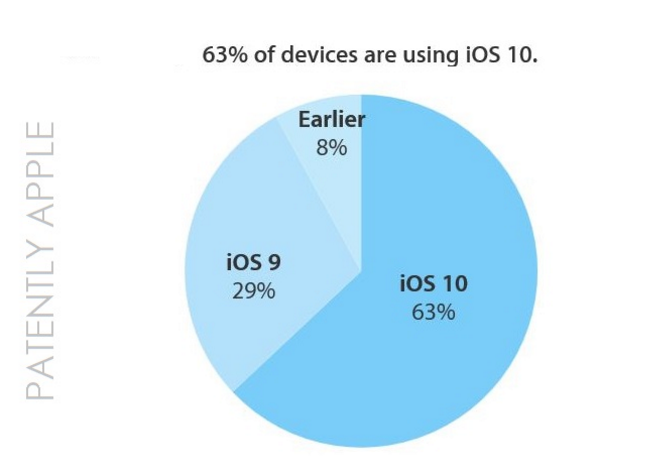
Although the adoption rate for iOS is likely to spike by this time next week after millions of Apple fans around the world unwrap their shiny new iDevices tonight at midnight or Christmas morning, the rate as of this moments stands at 63%, up from 54% in late October. Apple released iOS on September 13, 2016. This time last year iOS 9 stood at 70%. It's difficult to assess whether the slightly lower adoption rate is directly due to slightly slower sales of iOS devices or because users took the advice from articles like the one from Mashable titled "7 reasons why you shouldn't update your iPhone to iOS 10." Apple's next updated iOS adoption chart should give us a better picture.

Apple's iOS 10 Adoption Rate Sits at 63%


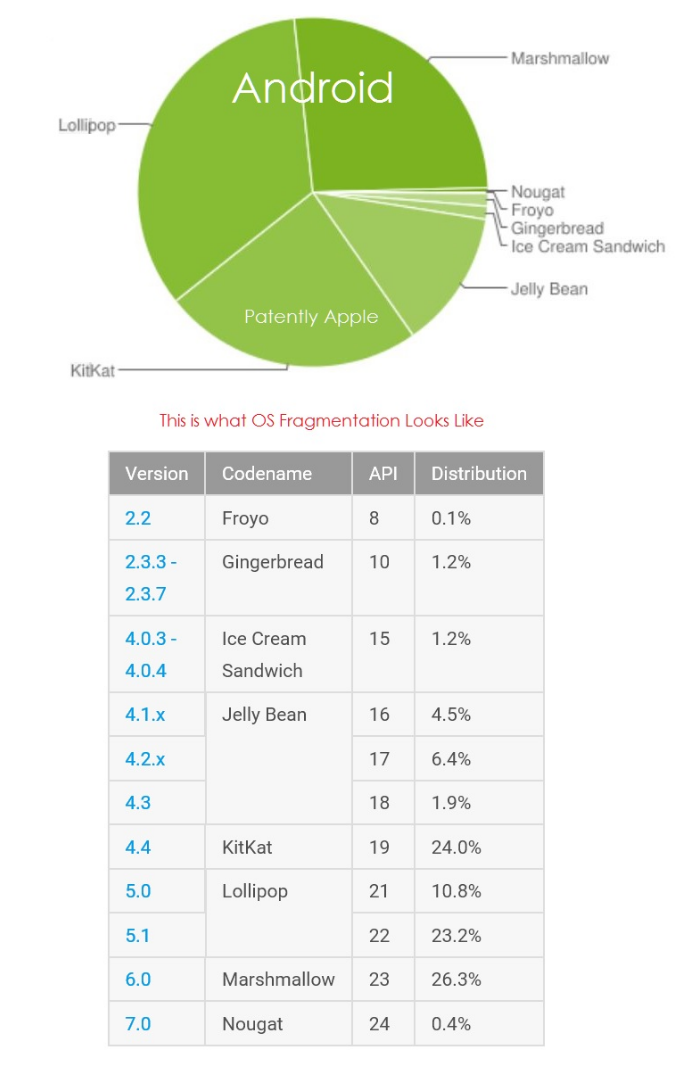
In stark contrast Google's Android Nougat OS, which was released on August 22, 2016, has an adoption rate of … drum roll … 0.4% as of December 5, 2016. That's well after the Google Pixel phone came to market and well after Black Friday sales. Worse is that Marshmallow, their previous Android version only stands at 26.3% and it was released in October 2015.

Apple's iOS 10 Adoption Rate Sits at 63%

With Android fans not being able to update their OS for a multitude of reasons has led to at least a million Android phones being infected with Gooligan or running into other forms of malware and ransomware. It was also reported last month that researchers had discovered that certain cheap Android phones were sending user's personal data to a firm in Shanghai.


Source: pantlyapple

Windows
Mac OS
iOS
Linux
3uTools
Win 64-bit For this device
V9.0 2025-11-11
Download
Win 32-bit For this device
V9.0 2025-11-11
Download
3uTools
Intel Chip How to Identify Chip Type
V9.0 2025-12-02
Download
Apple Chip
V9.0 2025-12-02
Download
How to Identify Chip Type
1.  Click the Apple icon in the top-left corner of the screen and select About This Mac.
2.  Check the Processor or Chip field to determine if it is "Intel" or "Apple".
Please use the 3uTools PC client to install the iOS client:
1、 Install either the Windows or Mac version of 3uTools on your computer
2、 Open the PC client and connect your device to the computer via USB cable
3、 After the connection is successful, wait for the computer to automatically install the mobile app for the device, or locate “Install Mobile App” on the computer and manually click to install.
3uTools
deb file
V3.01 2025-11-20
Download
rpm file
V3.01 2025-11-20
Download
Windows
Windows
iOS
iOS
Android
Android
TV
TV
3uAirPlayer
Win 64-bit For this device
V6.0.2 2025-11-19
Download
Win 32-bit For this device
V6.0.2 2025-11-19
Download
iOS Device Mirroring (No App Required)
1、 Install 3uAirPlayer on the Windows PC
2、 Open Control Center and select Screen Mirroring
3、 From the list, choose your PC to start mirroring
4、 Or connect your iOS device to the PC via USB to begin mirroring
Scan to get "3uAirPlayer" App
3uAirPlayer TV V1.0.18
2025-11-28
TV System Requirements: Android 7.0 or later
Download the TV installation package, copy it to a USB drive, insert it into your TV or set-top box, then select the file from the home screen to install.




