 NEWS
NEWS
Alleged iPhone X Plus Display Panel and Digitiser Leaks
 02/26/2018
 2712
2712
Alleged photos of the 6.5-inch iPhone X Plus front glass and digitizer have been posted online. The source of the leaked images claims the parts were manufactured at an LG facility in Vietnam as a part of trial production equipment run.
The photo of the front glass panel does not mention its size, but its clearly evident that it is bigger than the 5.8-inch iPhone X. This likely points to it being around 6.5-inch in size which is in line with rumors of Apple launching a 6.5-inch iPhone X Plus later this year. The notch is certainly smaller on the leaked front glass panel in the photo but it is possible that the bigger dimensions allowed Apple to reduce the overall notch size.
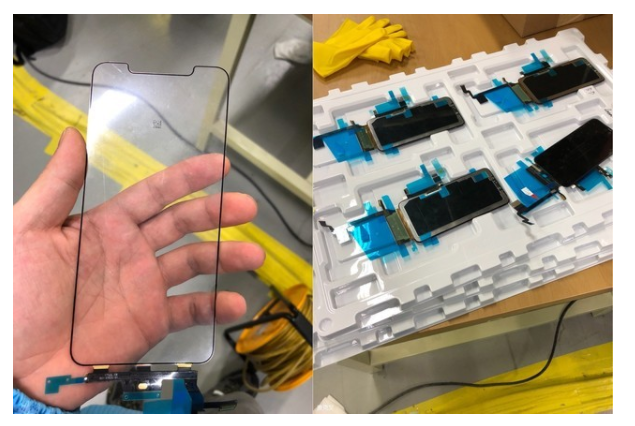
The part number printed in the flex cable also matches with the format traditionally used by Apple. The number points to the part being manufactured in the 46th week of 2017 i.e. somewhere around the middle of November.
Another leaked photo gives us a look at the assembled digitizer and display parts for the iPhone X Plus. You cannot really make out much from this picture, though once again the part does seem to be a bit too big for the 5.8-inch iPhone X.
Our Take
Reputed and reliable KGI Securities analyst Ming-Chi Kuo has repeatedly said in his investors note that Apple will be launching a 6.5-inch iPhone X Plus in 2018. This will complement the 5.8-inch iPhone X which many people have deemed to be a bit too small. Additionally, Apple is also predicted to launch a 6.1-inch iPhone with an LCD display this year. This budget iPhone will feature a single camera setup and aluminum chassis to keep its price in check. Apple will reportedly be sourcing OLED displays from LG this time around which likely explains why the trial production run was conducted at LG’s facility in Vietnam. While Apple will also continue to source OLED panels from Samsung in 2018, it will not solely rely on it like it had to do with the 2017 iPhone X.
Source: iPhonehacks










