 NEWS
NEWS
Apple Stopped iOS 9.1 Signing
 12/22/2015
 8056
8056
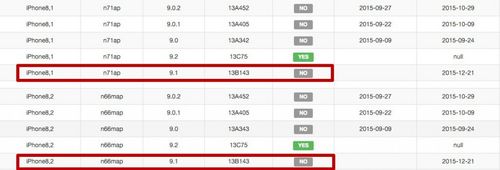
Apple has just stopped the signing of iOS 9.1, which means you can't downgrade your iOS devices, including iPhone, iPad and iPod Touch from 9.2 to 9.1 from now on. However, as of now, some users would like to ask whether it is possible to downgrade iOS 9.1 to 9.0.2 so that they can jailbreak their iOS devices. Of course the answer is, no.
Herein, the reason is simple that the Apple often stops the signing of older versions of iOS shortly after the release of the latest iOS firmware. Probably the Apple aims to restore the bugs and patch the loopholes in order to ensure the security performance of iOS, the world’s best mobile operating system. What’s more, the company also wants to make a big hit against the iOS jailbreaking industry.
Apple released the iOS9.2 officially a few days ago, and then pushed the iOS 9.2.1 beta 1 to the registered iOS developers. During this period, lots of iOS users were waiting the release of iOS9.2 untethered jailbreak by JB teams. However, two days ago 3K assistant, the sponsor of a famour Jailbreak team TaiG, announced on Sina Weibo that the Jailbreak team made an important breakthrough on the iOS 9.2 and promised that the iOS 9.2 jailbreak untethered will come soon.
That piece of news hasn’t been strongly confirmed by the authority, but it’s worthy of our believing that the expected iOS 9.2 jialbreak tool will come out before the Chinese Spring Festival, whose significance is similar to the Christmas Eve for the Westerners. Therefore, that means the particular will be released by TaiG team or 3K assistant before February, 2016.
In such a situation, absolutely it’s not a good idea for the iOS users to upgrade their iPhone, iPad and iPod Touch to the latest iOS9.2 when they want to ensure their iOS devices are suitable for jailbreak untethered.
However, if you need a tool to help you jailbreak iOS9-9.0.2, iOS8-8.4, iOS7-7.1.2, iOS6-6.15, iOS5-5.11 or iOS4-4.3.5, 3uTools is a good option. In addition, 3uTools can also flash your jailbroken devices back to the official iOS firmware.










