 NEWS
NEWS
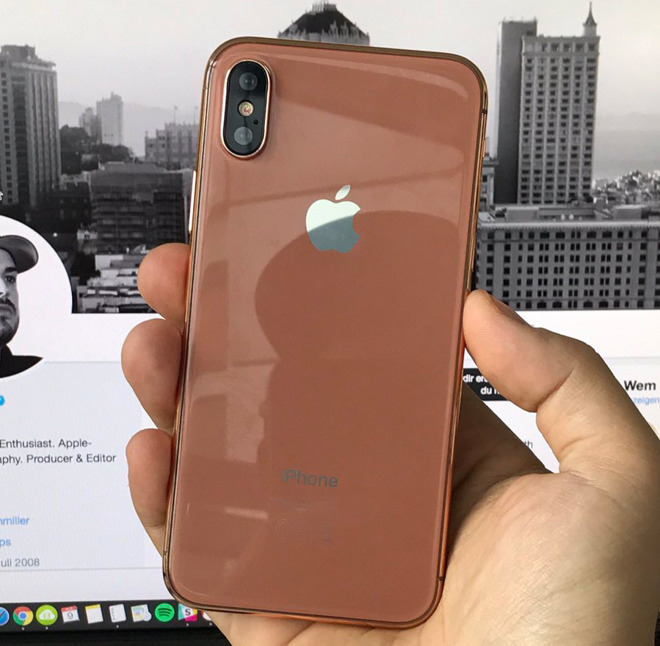
Foxconn’s Internal Name of the New #iPhone8 color is "Blush Gold"
 08/14/2017
 3312
3312
It was reported last week that the iPhone 8 will come in a new copper gold color shade, alongside white and black. Now, a post on Chinese social sharing site Weibo claims Apple’s name for the color will be “Blush Gold.”
Furthermore, the report claims that Apple will only offer the Blush Gold iPhone 8 in the 64GB and 128GB capacities. Apple currently limits the Jet Black iPhone 8 to the 128GB and 256GB capacities, but it’s a bit odd that the Blush Gold model would be limited to the 64GB and 128GB, not the highest end model.
The rumor was shared on Twitter by Benjamin Geskin, who cites a post on Weibo from a “Foxconn insider.” Considering the source, the claim should be taken with a pretty hefty grain of salt.
Foxconn’s internal name of the new #iPhone8 color is "Blush Gold" Barcode says “Blush Gold 64GB / 128GB”
The copper gold iPhone 8 was first reported earlier this week as a slightly different variation of the typical Rose Gold. It’s kind of an interesting color choice as it’s not quite orange and not quite gold. The same report cited a Foxconn vice president who claimed the “estimated iPhone 8 is not cheap.”
Meanwhile, KGI’s Ming-Chi Kuo claimed that the iPhone 8 will come in three color choices including copper gold, white, and black. Kuo also added that the iPhone 8 will launch on time alongside the iPhone 7s, though it will be in limited in terms of supply.
Several videos and renders emerged this week claiming to show the Blush Gold color of the iPhone 8 in dummy form. The device is expected to have a white front bezel design, as opposed to black.
In a poll we ran earlier this week, the majority of respondents said they would prefer a black color. In second place was the rumored mirror-like color, though it’s unclear if that shade will come to fruition. The copper gold option in came third, followed by white.
Source: 9to5mac










