
NEWS

Apple Working With ‘Multiple Companies’ On New Smart Connector Accessories

08/14/2017

2507

With the launch of the iPad Pro, Apple unveiled its new Smart Connector technology to allow accessory makers to more seamlessly integrate with the device. Two years after the first iPad Pro’s release, however, the Smart Connector hasn’t necessarily gained a whole lot of traction. A new report from Fast Company this week offers some insight into Apple’s efforts to have accessory makers adopt the Smart Connector…


When pressed for why they haven’t adopted Smart Connector, many accessory makers cited wait times and high prices for Smart Connector components. Some touted Bluetooth as a more viable alternative. 
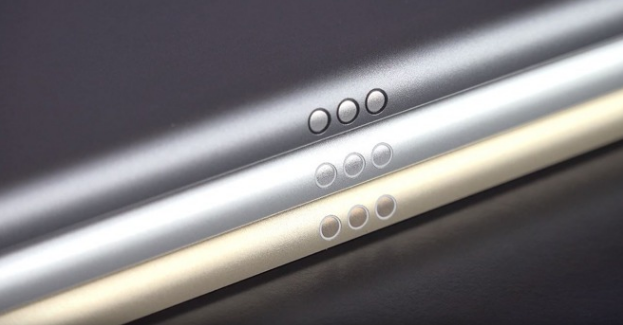

Apple Working With ‘Multiple Companies’ On New Smart Connector Accessories


Then, the CEO of Brydge – the company behind several popular Bluetooth keyboards – says that the Smart Connector technology is “incredibly limiting” and that Brydge has “no reason” to implement the connector in its current state.


For its part, Apple says that there are “multiple companies” now developing Smart Connector accessories. As for when their accessories will hit the market, however, remains to be seen.


Source: 9to5mac

Windows
Mac OS
iOS
Linux
3uTools
Win 64-bit For this device
V9.0 2025-11-11
Download
Win 32-bit For this device
V9.0 2025-11-11
Download
3uTools
Intel Chip How to Identify Chip Type
V9.0 2025-12-02
Download
Apple Silicon
V9.0 2025-12-02
Download
How to Identify Chip Type
1.  Click the Apple icon in the top-left corner of the screen and select About This Mac.
2.  Check the Processor or Chip field to determine if it is "Intel" or "Apple".
Please use the 3uTools PC client to install the iOS client:
1、 Install either the Windows or Mac version of 3uTools on your computer
2、 Open the PC client and connect your device to the computer via USB cable
3、 After the connection is successful, wait for the computer to automatically install the mobile app for the device, or locate “Install Mobile App” on the computer and manually click to install.
3uTools
deb file
V3.01 2025-11-20
Download
rpm file
V3.01 2025-11-20
Download
Windows
Windows
iOS
iOS
Android
Android
TV
TV
3uAirPlayer
Win 64-bit For this device
V6.0.2 2025-11-19
Download
Win 32-bit For this device
V6.0.2 2025-11-19
Download
iOS Device Mirroring (No App Required)
1、 Install 3uAirPlayer on the Windows PC
2、 Open Control Center and select Screen Mirroring
3、 From the list, choose your PC to start mirroring
4、 Or connect your iOS device to the PC via USB to begin mirroring
Scan to get "3uAirPlayer" App
3uAirPlayer TV V1.0.18
2025-11-28
TV System Requirements: Android 7.0 or later
Download the TV installation package, copy it to a USB drive, insert it into your TV or set-top box, then select the file from the home screen to install.




