NEWS

iPhone Smuggler Arrested Sneaking 102 Handsets in China

07/19/2017

2612

iPhone Smuggler Arrested Sneaking 102 Handsets in China


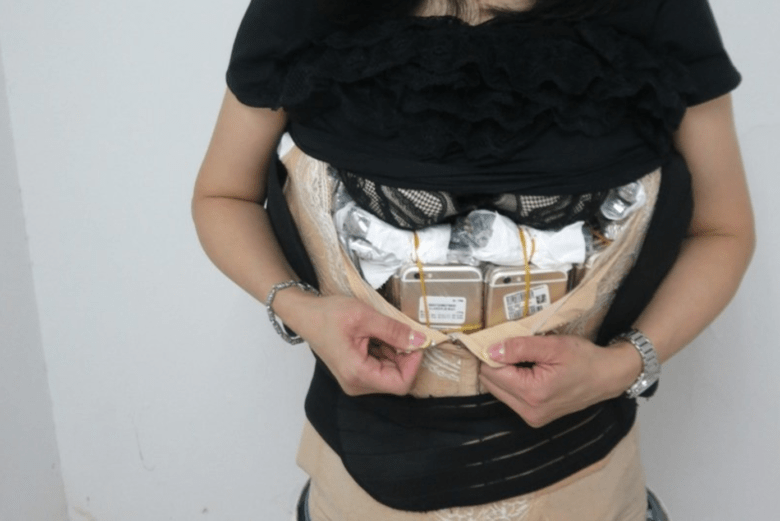
An iPhone smuggler has been arrested after attempting to sneak a record 102 handsets into mainland China. The woman, who was traveling from Hong Kong, was also carrying 15 luxury watches for a total 42 pounds of contraband.


Apple sells the iPhone in China now, and has done for years, but there’s still incredible demand for its devices on the black market where customers don’t have to pay heavy taxes. That makes smuggling handsets into the country big business.


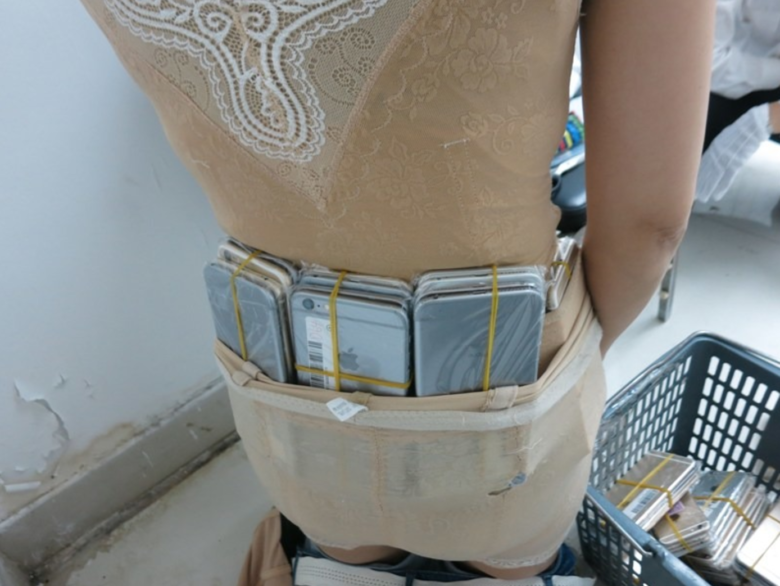
Shenzhen Louhu customs officers say they normally spot smuggles with “less than a dozen” iPhones, but periodically find people with 70 to 80 devices. Their latest bust, a woman who has since been nicknamed the “female Iron Man,” had 102 handsets strapped to her person.

iPhone Smuggler Arrested Sneaking 102 Handsets in China


They were individually sealed in plastic bags and sandwiched in four layers before being secured around her torso and waist. Unsurprisingly, officials pulled her aside after spotting unusual bulges and strange body proportions.


Is is believed most of the handsets were iPhone 6 models, but it’s not clear if they were genuine Apple devices or convincing third-party clones. Alongside 15 luxury watches, the total weight of the haul was 42 pounds.


Source: cult of mac

Windows
Mac OS
iOS
Linux
3uTools
Win 64-bit For this device
V9.0 2025-11-11
Download
Win 32-bit For this device
V9.0 2025-11-11
Download
3uTools
Intel Chip How to Identify Chip Type
V9.0 2025-12-02
Download
Apple Silicon
V9.0 2025-12-02
Download
How to Identify Chip Type
1.  Click the Apple icon in the top-left corner of the screen and select About This Mac.
2.  Check the Processor or Chip field to determine if it is "Intel" or "Apple".
Please use the 3uTools PC client to install the iOS client:
1、 Install either the Windows or Mac version of 3uTools on your computer
2、 Open the PC client and connect your device to the computer via USB cable
3、 After the connection is successful, wait for the computer to automatically install the mobile app for the device, or locate “Install Mobile App” on the computer and manually click to install.
3uTools
deb file
V3.01 2025-11-20
Download
rpm file
V3.01 2025-11-20
Download
Windows
Windows
iOS
iOS
Android
Android
TV
TV
3uAirPlayer
Win 64-bit For this device
V6.0.2 2025-11-19
Download
Win 32-bit For this device
V6.0.2 2025-11-19
Download
iOS Device Mirroring (No App Required)
1、 Install 3uAirPlayer on the Windows PC
2、 Open Control Center and select Screen Mirroring
3、 From the list, choose your PC to start mirroring
4、 Or connect your iOS device to the PC via USB to begin mirroring
Scan to get "3uAirPlayer" App
3uAirPlayer TV V1.0.18
2025-11-28
TV System Requirements: Android 7.0 or later
Download the TV installation package, copy it to a USB drive, insert it into your TV or set-top box, then select the file from the home screen to install.