
NEWS

iPhone Melts In Sun, Says Customer

06/21/2017

2654

Some parts of the world are currently boiling.


Why, some smaller jets can't even land at or takeoff from Phoenix Airport because it's 120 degrees. In the UK, of course, a heatwave is anything over 70. Brits begin to burn at that temperature. 


Still, it seems that one Apple customer didn't quite appreciate that her iPhone 6S might also be susceptible to a little sunstroke when it's 86 degrees outside. 


As CornwallLive reports, an unnamed woman discovered this to her cost. Her phone repair specialist, Dave Tech Guy, told CornwallLive: "It was a girl who had been out walking, had stopped for lunch, and the phone was on the top of her bag." Where it reportedly sat for an hour.


Of course Dave Tech Guy isn't his real name. It's David Gilmore. He posted images of the iPhone to his Facebook page on Tuesday. They are, indeed, gruesome. "The sun was strong enough to heat up the screen so much it melted the screen connectors," he said on Facebook.
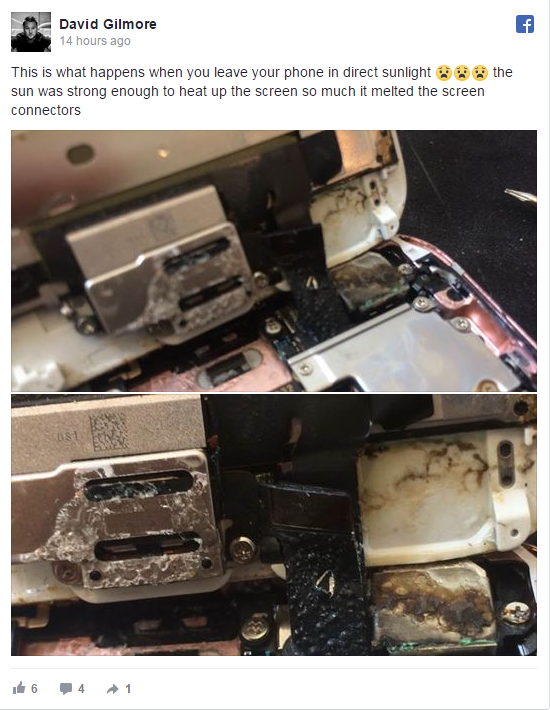

iPhone Melts In Sun, Says Customer


The consequences were painful. "It's the worst damage of this sort I've seen," Gilmore told CornwallLive. He said even the camera had melted. He believes the phone to be unsalvageable. 


Neither Apple nor Gilmore immediately responded to requests for comment.


Source: CNET

Windows
Mac OS
iOS
Linux
3uTools
Win 64-bit For this device
V9.0 2025-11-11
Download
Win 32-bit For this device
V9.0 2025-11-11
Download
3uTools
Intel Chip How to Identify Chip Type
V9.0 2025-12-02
Download
Apple Silicon
V9.0 2025-12-02
Download
How to Identify Chip Type
1.  Click the Apple icon in the top-left corner of the screen and select About This Mac.
2.  Check the Processor or Chip field to determine if it is "Intel" or "Apple".
Please use the 3uTools PC client to install the iOS client:
1、 Install either the Windows or Mac version of 3uTools on your computer
2、 Open the PC client and connect your device to the computer via USB cable
3、 After the connection is successful, wait for the computer to automatically install the mobile app for the device, or locate “Install Mobile App” on the computer and manually click to install.
3uTools
deb file
V3.01 2025-11-20
Download
rpm file
V3.01 2025-11-20
Download
Windows
Windows
iOS
iOS
Android
Android
TV
TV
3uAirPlayer
Win 64-bit For this device
V6.0.2 2025-11-19
Download
Win 32-bit For this device
V6.0.2 2025-11-19
Download
iOS Device Mirroring (No App Required)
1、 Install 3uAirPlayer on the Windows PC
2、 Open Control Center and select Screen Mirroring
3、 From the list, choose your PC to start mirroring
4、 Or connect your iOS device to the PC via USB to begin mirroring
Scan to get "3uAirPlayer" App
3uAirPlayer TV V1.0.18
2025-11-28
TV System Requirements: Android 7.0 or later
Download the TV installation package, copy it to a USB drive, insert it into your TV or set-top box, then select the file from the home screen to install.




