
NEWS

Apple Adds Phobio as New Mac Trade-In Partner

06/21/2017

3191

Apple today updated its Mac recycling program to partner with a new company, replacing longtime partner PowerOn with Phobio, a company that promises a seamless device buyback program. Apple's recycling program is designed to offer Apple users cash for their old devices by providing simple trade-in options. 

Starting today, when you use Apple's 
Renew and Recycling program to recycle a Mac desktop or notebook, Apple will now direct you to Phobio's site where you can find your Mac by entering a serial number. After answering a couple of questions about condition, Phobio offers up a price estimate and lets users choose an Apple Store Gift Card, Paypal, or Virtual Visa Reward as a payment option. 
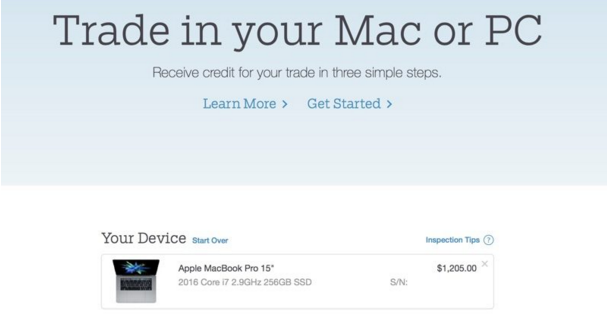

Apple Adds Phobio as New Mac Trade-In Partner

Apple opted to go with Phobio because the site offers higher trade-in values, is easier to navigate, and provides an option for cash payments alongside Apple Store Gift Cards, something that wasn't available via PowerOn. 


Based on our testing, Phobio and PowerOn offer similar trade-in values for many machines, with PowerOn offering a slight edge in value for newer Macs, while Phobio seems to have slightly better pricing for some older models. 

Apple is only partnering with Phobio for Mac trade-ins at the current time. For PC trade-ins, Apple continues to work with PowerOn, and for iPad and iPhone trade-ins, Apple is still using longtime partner Brightstar.


Source: macrumors

Windows
Mac OS
iOS
Linux
3uTools
Win 64-bit For this device
V9.0 2025-11-11
Download
Win 32-bit For this device
V9.0 2025-11-11
Download
3uTools
Intel Chip How to Identify Chip Type
V9.0 2025-12-02
Download
Apple Silicon
V9.0 2025-12-02
Download
How to Identify Chip Type
1.  Click the Apple icon in the top-left corner of the screen and select About This Mac.
2.  Check the Processor or Chip field to determine if it is "Intel" or "Apple".
Please use the 3uTools PC client to install the iOS client:
1、 Install either the Windows or Mac version of 3uTools on your computer
2、 Open the PC client and connect your device to the computer via USB cable
3、 After the connection is successful, wait for the computer to automatically install the mobile app for the device, or locate “Install Mobile App” on the computer and manually click to install.
3uTools
deb file
V3.01 2025-11-20
Download
rpm file
V3.01 2025-11-20
Download
Windows
Windows
iOS
iOS
Android
Android
TV
TV
3uAirPlayer
Win 64-bit For this device
V6.0.2 2025-11-19
Download
Win 32-bit For this device
V6.0.2 2025-11-19
Download
iOS Device Mirroring (No App Required)
1、 Install 3uAirPlayer on the Windows PC
2、 Open Control Center and select Screen Mirroring
3、 From the list, choose your PC to start mirroring
4、 Or connect your iOS device to the PC via USB to begin mirroring
Scan to get "3uAirPlayer" App
3uAirPlayer TV V1.0.18
2025-11-28
TV System Requirements: Android 7.0 or later
Download the TV installation package, copy it to a USB drive, insert it into your TV or set-top box, then select the file from the home screen to install.




