 NEWS
NEWS
What Apple Thought the iPhone Might Look Like in 1995
 06/15/2017
 3649
3649
More than a decade before the smartphone was unveiled, the tech giant made a mock-up design for a videophone-PDA that could exchange data.
A decade ago, for the most part, phones were phones. Computers were computers. Cameras were cameras. Portable music players were portable music players. The idea that the future of the computer would be a phone, or vice versa, wasn’t merely absurd. It just wasn’t how people thought about consumer technology. At all.
So when the first iPhone was unveiled in 2007, plenty of people assumed it wouldn’t change the world. (“Touch-screen buttons? BAD idea. This thing will never work,” as one naysayer put it at the time.)
To those who had been watching Apple since the 1980s, however, shrinking computers and videophones seemed to be always just tantalizingly out of reach, emblems of a future that would, fingers crossed, eventually arrive.
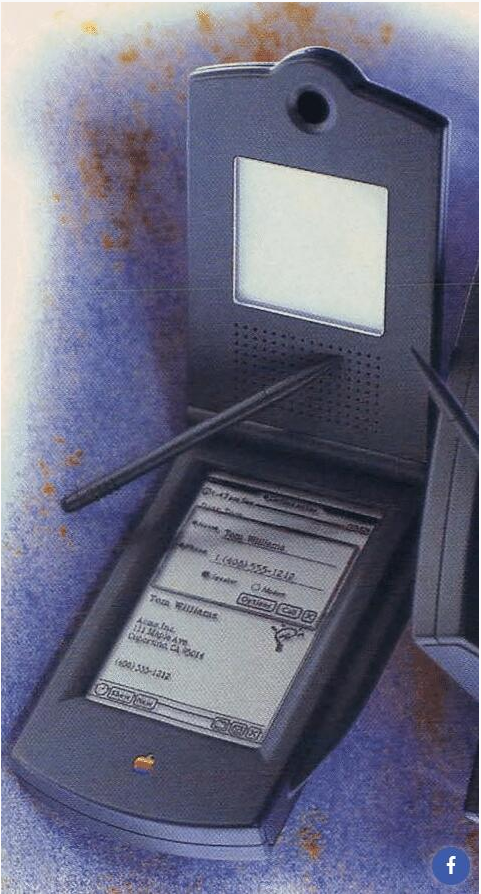
But when? By 1995, even though Apple’s laptops had dipped to a svelte six pounds, and the transformative power of the internet was becoming apparent, the next great iteration of the web was barely imaginable. Today’s mobile web, the one that would be ushered in by smartphones, was still out of reach. But there were hints of what was to come.
Apple has always been fond of dreaming up hardware and software from a not-too-distant future, and there are glimmers of the iPhone in Apple’s history since long before the rumors about the device were taken seriously in the early 2000s. More than a decade before the smartphone was unveiled, Apple shared with the computing magazine a semi-outlandish design for a videophone-PDA that could exchange data. (Smartphones eventually made the PDA, or personal digital assistant, obsolete.)
The prototype for the device, published in the May 1995 issue of the magazine, is something of a missing link between the Newton and the iPhone—though still more parts the former than the latter. The Newton was Apple’s lackluster PDA, first released in 1987, 20 years pre-iPhone. The Newton may have been ahead of its time in some ways; but it also failed because it was pricey and didn’t work particularly well. (In 1993, one pithy New York Times writer memorialized his attempts to write on the device this way: “This is being writings a worth it takes a while before the handed tiny red floor is footprint. Signed, Bite (poof!) Beers (poof!) been (poof!) I sits.”)
The rototype combined a PDA and a videophone, complete with handset, and visualized a future in which the devices would be able to exchange data. Naturally, because this was 1995, the concept also included a CD drive and a stylus.
Source: theatlantic










