 NEWS
NEWS
A Stroll Through Apple Park Reveals Green Landscape Progressing
 06/15/2017
 3755
3755
Apple Park is starting to look a lot more like a park as Apple makes rapid progress on the massive landscaping job and continues construction at the site. The image below give a good ground level look at the thousands of trees being planted around the main circular building on the 175-acre campus.
While Apple announced back in February that Apple Park would be ready for employees to begin moving in by April, the site still appears to be more in construction mode and it’s unclear what Apple staff if any is actually already working at the new campus. The company is also expected to host future events at the 1000-seat Steve Jobs Theatre located at Apple Park, but chatter from construction workers is that finishing touches could go beyond the end of the year and the new iPhone unveiling expected to be Apple’s next event in September.
Apple’s plans called for around 9,000 trees of 300+ varieties, with green space taking up approximately 80% of the entire campus. That should make it look more like a public park when complete compared to the typical office building or Apple’s current headquarters in Cupertino, and indeed it will serve as one.
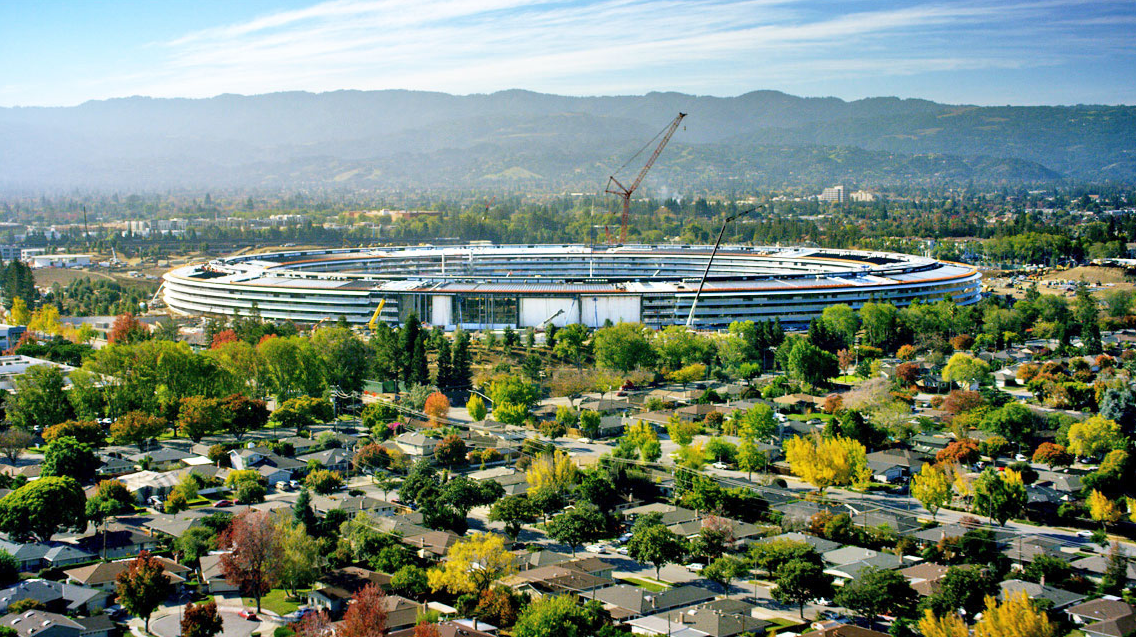
Apple Park will have an Apple Store and cafe open to the public, so the parklands surrounding the main buildings will actually be public green space when finished. Apple will also have two miles of paths for employees on the interior of the spaceship-shaped building, as well as an orchard, meadow, and pond.
Apple is well on its way as landscaping work has picked up steam in recent weeks and the campus begins to look more like Apple’s original vision.
Many of the 9,000 trees, all native and drought-resistant chosen specifically for the campus, are being grown off-site and transplanted, in some cases by cranes for the larger trees. You can see a tree that was brought in waiting to be planted in the image above.
Apple is replacing 5 million square feet of asphalt and concrete that was there when it purchased the site. The one thing missing still are the grassy fields that will surround the trees and the entire campus, but that will likely be the finishing touch after construction is complete and machinery moved elsewhere. To help manage all the green space, the company led and partly funded a $17.5 million project to increase the use of recycled water in Sunnyvale and Cupertino amid drought concerns for the area.
Source: 9to5mac










