
NEWS

Apple Patent Details How Siri Could Work in Noisy Environments

05/12/2017

2865

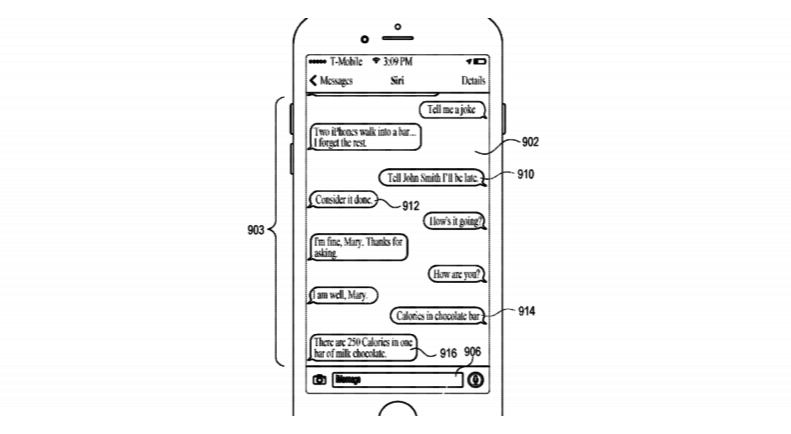
Apple is working on a way for you to control Siri in iMessage, rather than with your voice. The company has applied for a patent that lets you use the digital assistant without having to talk to it.


In case you find that a little hard to understand, this means the digital assistant (Siri), will perform an action in response to your input in a text conversation, then respond to the text.

Apple Patent Details How Siri Could Work in Noisy Environments


The most obvious use for this is environments where talking to Siri aloud is impractical — a very loud environment where Siri can’t hear you, like a sporting event; or a very quiet one where you can’t speak, such as a library (though definitely not a movie theater, you heathen).


This might also be helpful for hearing-impaired users or those with speech impediments who might have trouble interacting with the audio-focused assistant.


Source: thenextweb

Windows
Mac OS
iOS
Linux
3uTools
Win 64-bit For this device
V9.0 2025-11-11
Download
Win 32-bit For this device
V9.0 2025-11-11
Download
3uTools
Intel Chip How to Identify Chip Type
V9.0 2025-12-02
Download
Apple Silicon
V9.0 2025-12-02
Download
How to Identify Chip Type
1.  Click the Apple icon in the top-left corner of the screen and select About This Mac.
2.  Check the Processor or Chip field to determine if it is "Intel" or "Apple".
Please use the 3uTools PC client to install the iOS client:
1、 Install either the Windows or Mac version of 3uTools on your computer
2、 Open the PC client and connect your device to the computer via USB cable
3、 After the connection is successful, wait for the computer to automatically install the mobile app for the device, or locate “Install Mobile App” on the computer and manually click to install.
3uTools
deb file
V3.01 2025-11-20
Download
rpm file
V3.01 2025-11-20
Download
Windows
Windows
iOS
iOS
Android
Android
TV
TV
3uAirPlayer
Win 64-bit For this device
V6.0.2 2025-11-19
Download
Win 32-bit For this device
V6.0.2 2025-11-19
Download
iOS Device Mirroring (No App Required)
1、 Install 3uAirPlayer on the Windows PC
2、 Open Control Center and select Screen Mirroring
3、 From the list, choose your PC to start mirroring
4、 Or connect your iOS device to the PC via USB to begin mirroring
Scan to get "3uAirPlayer" App
3uAirPlayer TV V1.0.18
2025-11-28
TV System Requirements: Android 7.0 or later
Download the TV installation package, copy it to a USB drive, insert it into your TV or set-top box, then select the file from the home screen to install.




