NEWS

Mother's Day Activity Challenge Will Require Apple Watch Owners to Finish 1-Mile Workout

05/09/2017

3790

Mother's Day takes place in the United States this Sunday, May 14, and Apple is gearing up to launch an all-new challenge in the Activity app for Apple Watch owners in order to celebrate the national holiday. The challenge will begin showing up in the Activity app this Friday, May 12, but will only be open on Sunday. 

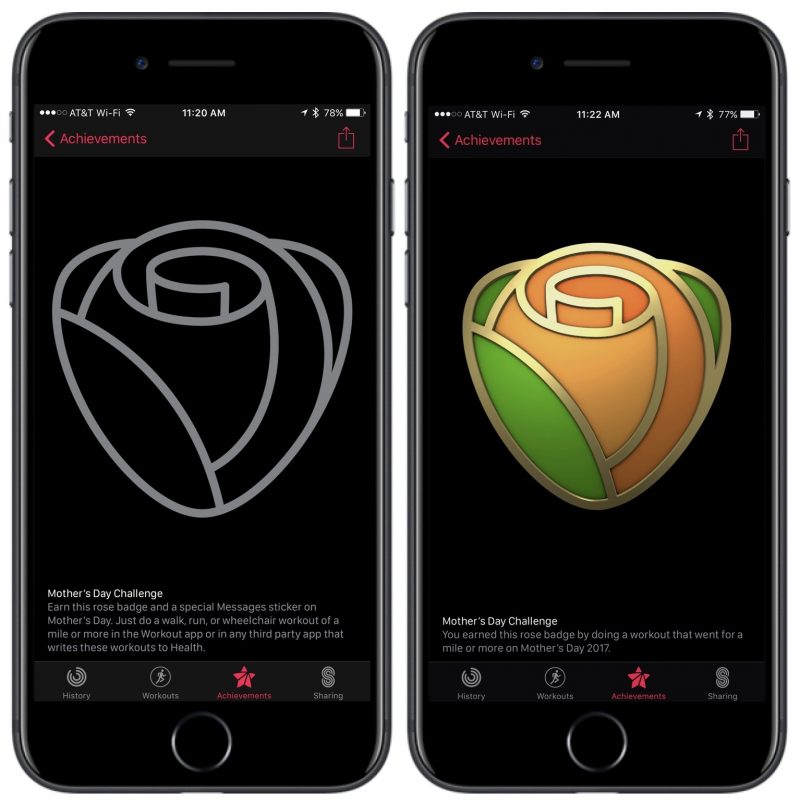
To accomplish the challenge, users will have to complete a walk, run, or wheelchair workout that lasts for one mile or longer on Mother's Day. Users who meet that goal will get a Mother's Day achievement in the Activity app, and a sticker to use in Messages. The challenge will only be available to Apple Watch owners in the United States.

Mother's Day Activity Challenge Will Require Apple Watch Owners to Finish 1-Mile Workout


"Earn this rose badge and a special Messages sticker on Mother's Day. Just do a walk, run, or wheelchair workout of a mile or more in the Workout app or in any third party app that writes these workouts to Health."


Mother's Day will mark the fourth public challenge that Apple has debuted for Apple Watch owners, coming after a 3.1-mile workout on Thanksgiving, an Activity ring competition in January to celebrate the New Year, and a 30-minute outdoor exercise on Earth Day

Mother's Day Activity Challenge Will Require Apple Watch Owners to Finish 1-Mile Workout
Apple Watch owners can track their Mother's Day workout through Apple's own Workout app, or using any third party app that can connect and track exercise data through the Health app. Similar to the previous Activity challenges, users will have only the designated window -- in this case, one day -- to complete their workout before the achievement and sticker are no longer able to be earned.


Source: macrumors


Windows
Mac OS
iOS
Linux
3uTools
Win 64-bit For this device
V9.0 2025-11-11
Download
Win 32-bit For this device
V9.0 2025-11-11
Download
3uTools
Intel Chip How to Identify Chip Type
V9.0 2025-12-02
Download
Apple Silicon
V9.0 2025-12-02
Download
How to Identify Chip Type
1.  Click the Apple icon in the top-left corner of the screen and select About This Mac.
2.  Check the Processor or Chip field to determine if it is "Intel" or "Apple".
Please use the 3uTools PC client to install the iOS client:
1、 Install either the Windows or Mac version of 3uTools on your computer
2、 Open the PC client and connect your device to the computer via USB cable
3、 After the connection is successful, wait for the computer to automatically install the mobile app for the device, or locate “Install Mobile App” on the computer and manually click to install.
3uTools
deb file
V3.01 2025-11-20
Download
rpm file
V3.01 2025-11-20
Download
Windows
Windows
iOS
iOS
Android
Android
TV
TV
3uAirPlayer
Win 64-bit For this device
V6.0.2 2025-11-19
Download
Win 32-bit For this device
V6.0.2 2025-11-19
Download
iOS Device Mirroring (No App Required)
1、 Install 3uAirPlayer on the Windows PC
2、 Open Control Center and select Screen Mirroring
3、 From the list, choose your PC to start mirroring
4、 Or connect your iOS device to the PC via USB to begin mirroring
Scan to get "3uAirPlayer" App
3uAirPlayer TV V1.0.18
2025-11-28
TV System Requirements: Android 7.0 or later
Download the TV installation package, copy it to a USB drive, insert it into your TV or set-top box, then select the file from the home screen to install.