 NEWS
NEWS
iPhone 8 First Supposed Leak Shows Bezel-Free Front And Rear Touch ID
 04/14/2017
 3617
3617
Will the upcoming iPhone 8 have a bigger screen than iPhone 7? The first supposed leak of the new iPhone 8 shows it may have minimal bezels on all sides.
The website Weibo just posted a technical schematics picture of what it claims is the new iPhone 8. The technical picture of the next-generation iPhone has come straight from Foxconn.
In the drawing we can see an iPhone but with minimal bezels on the left and right sides of the screen. When compared to an iPhone 7 in dimensions it appears to be significantly smaller.
The picture also shows the top-left corner of the phone will now feature the dual camera system and rear flash. Both features have been stacked vertically on the back. There is also a gap for a Touch ID fingerprint sensor placed directly below the Apple logo.
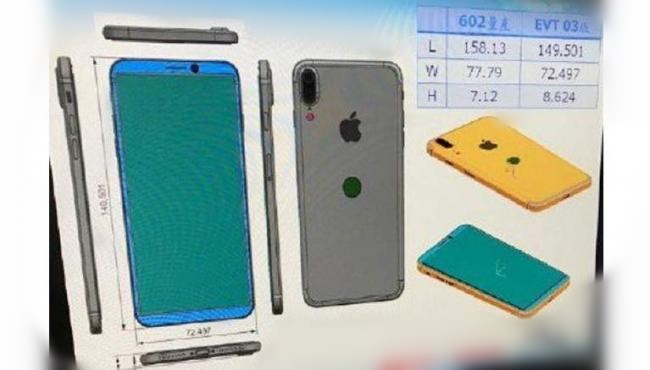
The leaked image is most probably a design drawing of the iPhone 8. It is possible it was taken for the purpose of an Engineering Validation Test (EVT) third revision.
The EVT is a test stage in the cycle of early Apple product development. After the EVT an Apple device still has to go through steps such as the Design Validation Test and Production Validation Test. After all these stages the product is then finalized.
Other rumors circulating about the new iPhone 8 are based on its Touch ID home button. Apple may be considering several different designs for the new iPhone 8 fingerprint sensors. Some are speculating the new sensor will be integrated into the display so it can be placed under the glass.
The leaked drawing also shows the new iPhone will have the same physical size of 4.7-inch as the iPhone 7. However the OLED screen will be much larger i.e. 5.8 inches which will be achieved by shrinking the bezels.
Source: i4u.com










