 NEWS
NEWS
Apple's iPhone 8 Said to Feature 'Water Drop Design' in Homage to Original iPhone
 03/21/2017
 3380
3380
Apple's upcoming 2017 iPhone will feature a design that's similar to the original iPhone, according to industry analysts who spoke to Korean site ETNews.
The site says the iPhone will use a "water drop design" that's an homage to the original iPhone, with a rear curve that is both gentler and rounder than existing metal case edges.
Apple is said to be using a three-dimensional glass material on the back of the iPhone 8 to make it more closely resemble the deeper curves on the case of the original iPhone. It would, of course, be much larger than the first iPhone, with rumors suggesting a 5.8-inch display, and it would undoubtedly be much thinner.
The "3D glass case" is said to "make curves" around the top, bottom, left, and right edges of the iPhone, moving away from the less curved, flat back design that was introduced with the iPhone 4 and has been used in every iPhone up to the iPhone 7.
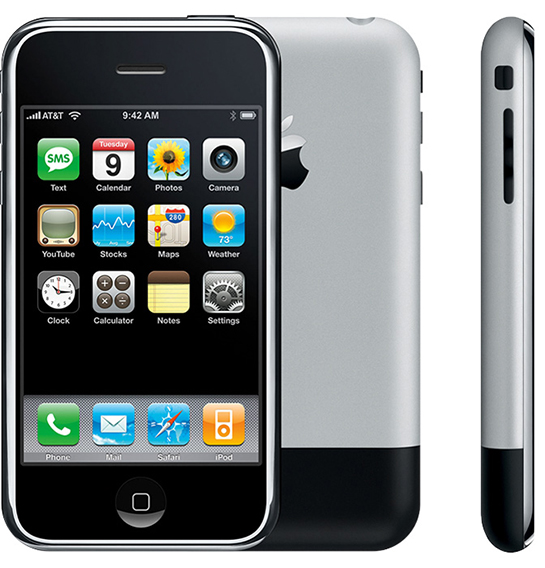
Apple used a curved aluminum and plastic design for the original iPhone and plastic alone for the iPhone 3G. Shape wise, the iPhone 8 is said to resemble the first iPhone, but it will use all glass, similar in design to the plastic used in the second iPhone.
While an original iPhone-style curved back is rumored to be included, ETNews agrees with existing display information and suggests the OLED screen of the iPhone 8 will be "relatively flat." It will not feature a dramatically curved edge like the Samsung Galaxy line.
There have been several mixed rumors about the curve of the iPhone 8's display due to difficulty interpreting details about what constitutes a curve, but information seems to be aggregating around a 2.5D design that features a similar curve to the existing iPhone 7. We expect the display, which is said to be edge-to-edge with no side bezels, to curve just slightly downward at the edges much like the cover glass of the iPhone 7.
Little has been said about the rear design of the 2017 iPhone, so there is no information to back up the claims shared by ETNews as of yet. Rumors do, however, suggest that it will indeed use an all-glass body, with Apple planning to move away from aluminum.
There has also been speculation that the 2017 iPhone will be celebrated and introduced as a 10th anniversary device, and in that light, an homage to the original iPhone makes some sense, but these design rumors should be viewed with some skepticism until confirmed by additional sources.
Source: macrumors










