 NEWS
NEWS
Apple Declares Three Older Mac Models Obsolete
 09/01/2026
 960
960
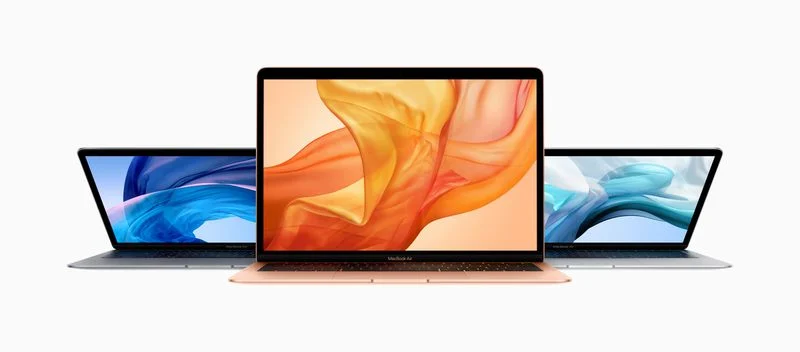
Apple has officially added three older Mac models to its obsolete products list, ending most hardware repair support for the affected devices. The models include the 2018 MacBook Air with Retina display, the 2018 13-inch MacBook Pro, and the 2017 13-inch MacBook Pro.
Which Mac Models Are Now Obsolete?
The three Mac models newly classified as obsolete are:
●2018 Retina MacBook Air
●13-inch 2018 MacBook Pro with four Thunderbolt 3 ports
●13-inch 2017 MacBook Pro with two Thunderbolt 3 ports
All three models were previously listed as vintage Apple products before being moved to the obsolete category.
What Does Apple's "Obsolete" Status Mean?
Apple generally classifies a product as vintage five years after it was last distributed for sale. After seven years, the product is typically moved to the obsolete list.
Vintage Macs may still receive repairs from Apple Stores and Apple Authorized Service Providers, provided replacement parts are available. Once a Mac becomes obsolete, Apple generally stops supplying repair components, meaning most hardware repairs are no longer available.
Battery Replacement May Still Be Available
There is an important exception for Mac notebook battery repairs. Apple can provide battery-only service for up to 10 years after a Mac notebook was last distributed for sale, depending on parts availability.
As a result, owners of the 2017 and 2018 MacBook Pro and 2018 MacBook Air may still be able to obtain a battery replacement even though the computers are now considered obsolete.
2018 MacBook Air Was a Major Redesign
The 2018 MacBook Air represented a significant update to Apple's popular laptop lineup. It was the first MacBook Air to feature a Retina display and Touch ID, delivering a substantial improvement over previous models.
Apple also redesigned the chassis with thinner bezels, a thinner profile, and a lighter body, giving the MacBook Air a more modern appearance.
2017 and 2018 MacBook Pro Features
The 2017 13-inch MacBook Pro was primarily a processor update, featuring Intel's Kaby Lake processors while retaining much of the design and hardware from the previous generation.
The 2018 MacBook Pro introduced several additional upgrades, including True Tone display technology and Apple's third-generation butterfly keyboard.
What This Means for MacBook Owners
For users still relying on these older MacBook models, Apple's move to the obsolete list is a reminder that official repair support is becoming increasingly limited.
While battery service may remain available, other hardware repairs could become difficult or impossible as replacement components become unavailable. Owners who depend on these machines for everyday work may want to consider upgrading to a newer MacBook Air or MacBook Pro before repair options become more restricted.
Source: Macrumors










