 NEWS
NEWS
iPhone 17 Remains World's Best Selling Smartphone
 08/27/2026
 2607
2607
The iPhone 17 retained its position as the world's best selling smartphone in the second quarter of 2026, according to Counterpoint Research, with the iPhone 17 Pro Max and iPhone 17 Pro holding the next two spots on the firm's quarterly ranking.
Data from Counterpoint's Global Handset Model Sales Tracker places the standard iPhone 17 at 6% of global smartphone unit sales for the second quarter, building on the top spot it already held in the first quarter. Apple and Samsung filled all ten of the top spots, with a combined 26% share of worldwide unit sales that was two points higher than a year earlier.
Counterpoint tied the growth to regional strength outside Apple's usual core markets, with gains in India, Japan, and the Middle East and Africa, plus a near doubling of sales in South Korea.
The base iPhone 17 model remained the best selling smartphone during the quarter, supported by significant upgrades that narrowed the gap with the Pro models. Meanwhile, strong premium demand drove the iPhone 17 Pro and Pro Max sales, aided by trade in programs, promotions, and accessible financing options that improved affordability.
Rising smartphone prices across the industry also nudged buyers toward more expensive pricing tiers generally, which largely worked in Apple's favor given its lineup skews upmarket already.
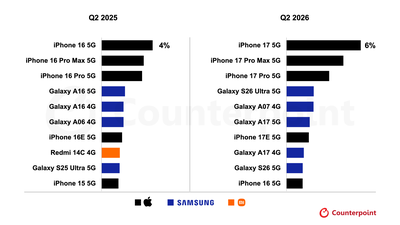
The iPhone 17e took seventh place following its refresh that added MagSafe and increased storage for the same price, boosted by compelling carrier deals in the U.S. and Japan. The iPhone 16 rounded out the list at number ten, leaving Apple with five of the ten slots, which is the same count and nearly the same positions Apple held a year earlier with the iPhone 16 lineup and iPhone 15.
Samsung's best performer was the Galaxy S26 Ultra in fourth place, which is the first time that Samsung's top tier device has outsold every other Android phone in the second quarter. This is said to partly be a reflection of Samsung steering more marketing spend toward its flagship models to protect margins as costs climb. Samsung's cheaper Galaxy A phones also remained competitive further down the market.
Overall, the smartphone market shrank 11% in the quarter, a contraction Counterpoint links to the ongoing shortages and price rises that has manufacturers concentrating resources on their most profitable phones. Apple and Samsung both grew unit sales against that backdrop, a divergence that is visible in Counterpoint's regional data as well.
Source: Macrumors










