
NEWS

Apple Quietly Refreshes Magic Keyboards

Just now

57

Apple today quietly introduced updated Magic Keyboard models with revised U.S. English key labeling.
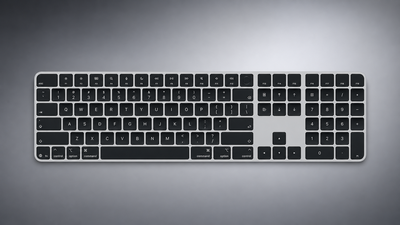
Apple Quietly Refreshes Magic Keyboards
On the new keyboards, the tab, caps lock, shift, return, and delete keycaps are labeled with glyphs rather than edge text. On the full-size models with a numeric keypad, the change goes further, with the home, page up, page down, end, clear, and enter keys also swapping their text labels for symbols.

Four models have been updated: the Magic Keyboard, the Magic Keyboard with Touch ID, and the Magic Keyboard with Touch ID and Numeric Keypad in both white keys and black keys.

The one U.S. English model Apple has not refreshed is the Magic Keyboard with Numeric Keypad, which lacks ‌Touch ID‌ and continues to use text labels on the same keys.

The change mirrors the one Apple made to its laptops earlier this year, when the new MacBook Air, MacBook Pro, and MacBook Neo adopted glyphs on the same set of keys.

Since the U.S. English layout is the default option in Canada, Australia, New Zealand, and Singapore, among other countries, the new labeling effectively extends well beyond the United States. Apple has used glyphs on its British English and other European layouts for some time, so the symbols will already be familiar to customers there.

Source: Macrumors

Windows
Mac OS
iOS
Linux
3uTools
Win 64-bit For this device
V9.08 2026-08-18
Download
Win 32-bit For this device
V9.08 2026-08-18
Download
3uTools
Intel Chip How to Identify Chip Type
V9.06 2026-08-20
Download
Apple Silicon
V9.06 2026-08-20
Download
How to Identify Chip Type
1.  Click the Apple icon in the top-left corner of the screen and select About This Mac.
2.  Check the Processor or Chip field to determine if it is "Intel" or "Apple".
Please use the 3uTools PC client to install the iOS client:
1、 Install either the Windows or Mac version of 3uTools on your computer
2、 Open the PC client and connect your device to the computer via USB cable
3、 After the connection is successful, wait for the computer to automatically install the mobile app for the device, or locate “Install Mobile App” on the computer and manually click to install.
3uTools
deb file
V9.02 2026-08-19
Download
rpm file
V9.02 2026-08-19
Download
Windows
Windows
iOS
iOS
Android
Android
TV
TV
3uAirPlayer
Win 64-bit For this device
V6.0.7 2026-08-25
Download
Win 32-bit For this device
V6.0.7 2026-08-25
Download
iOS Device Mirroring (No App Required)
1、 Install 3uAirPlayer on the Windows PC
2、 Open Control Center and select Screen Mirroring
3、 From the list, choose your PC to start mirroring
4、 Or connect your iOS device to the PC via USB to begin mirroring
Scan to get "3uAirPlayer" App
3uAirPlayerTV
 
TV System Requirements: Android 7.0 or later
Download the TV installation package, copy it to a USB drive, insert it into your TV or set-top box, then select the file from the home screen to install.




