NEWS

Apple Starts Preparing for September iPhone Event

08/05/2026

70

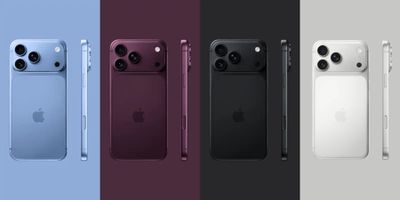
Apple is getting ready for its big September iPhone event, which is expected to see the debut of the iPhone 18 Pro, ‌iPhone 18 Pro‌ Max, and an all-new foldable iPhone.

Apple Starts Preparing for September iPhone Event
Ahead of the event, Apple is holding an Event Support Experience Program lottery for U.S. retail employees who want to travel to its Apple Park campus to staff the in-person media gathering. According to Bloomberg, Apple will bring in employees to organize lines, check in guests, offer directions, greet attendees, and support security teams.

Employees were told the iPhone event will take place during the first half of September, but Apple declined to offer more specific information. It's likely Apple will hold its event on Tuesday, September 8 or Wednesday, September 9. September 7 is Labor Day and Apple often gives members of the media a day to travel, so September 9 could be the target date this year.

Apple presumably pays for travel and lodging for employees who are invited to ‌Apple Park‌ to work the media event. Retail workers who were at the Worldwide Developers Conference or the iPhone launch in 2025 are not eligible to enter the lottery. Employees can enter the lottery until August 8, and Apple plans to notify winners on August 17.

Source: Macrumors

Windows
Mac OS
iOS
Linux
3uTools
Win 64-bit For this device
V9.07 2026-07-17
Download
Win 32-bit For this device
V9.07 2026-07-17
Download
3uTools
Intel Chip How to Identify Chip Type
V9.05 2026-07-25
Download
Apple Silicon
V9.05 2026-07-25
Download
How to Identify Chip Type
1.  Click the Apple icon in the top-left corner of the screen and select About This Mac.
2.  Check the Processor or Chip field to determine if it is "Intel" or "Apple".
Please use the 3uTools PC client to install the iOS client:
1、 Install either the Windows or Mac version of 3uTools on your computer
2、 Open the PC client and connect your device to the computer via USB cable
3、 After the connection is successful, wait for the computer to automatically install the mobile app for the device, or locate “Install Mobile App” on the computer and manually click to install.
3uTools
deb file
V9.01 2026-05-28
Download
rpm file
V9.01 2026-05-28
Download
Windows
Windows
iOS
iOS
Android
Android
TV
TV
3uAirPlayer
Win 64-bit For this device
V6.0.6 2026-06-26
Download
Win 32-bit For this device
V6.0.6 2026-06-26
Download
iOS Device Mirroring (No App Required)
1、 Install 3uAirPlayer on the Windows PC
2、 Open Control Center and select Screen Mirroring
3、 From the list, choose your PC to start mirroring
4、 Or connect your iOS device to the PC via USB to begin mirroring
Scan to get "3uAirPlayer" App
3uAirPlayerTV
 
TV System Requirements: Android 7.0 or later
Download the TV installation package, copy it to a USB drive, insert it into your TV or set-top box, then select the file from the home screen to install.