 NEWS
NEWS
Apple Face Detection Patent Hints at Possible PrimeSense Tech Headed For 'iPhone 8'
 03/08/2017
 3476
3476
Apple was awarded a patent today that details a method of detecting faces in a digital video feed through the use of depth information.
Published by the U.S. Patent and Trademark Office, the document describes how face detection algorithms could identify the presence of faces in a live video when people in the scene are located at different distances from the camera.
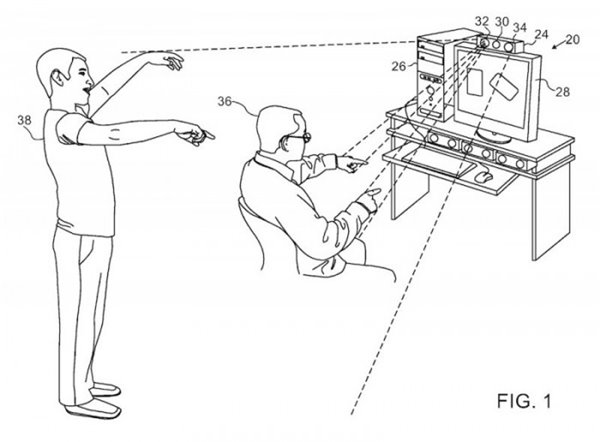
To reduce processing overhead and minimize error rates, the system applies depth information to existing face detection algorithms used in photography and intelligently scales the face window sizes according to their depth coordinates – i.e., the further away a face is from the lens, the smaller the capture frame around it.
The method utilizes a special infrared light to project an optical radiation pattern onto the scene, which is then converted into a depth map. The depth mapping system referenced in the patent is based on motion tracking technology developed by Israeli motion capture firm PrimeSense, which Apple acquired in 2013.
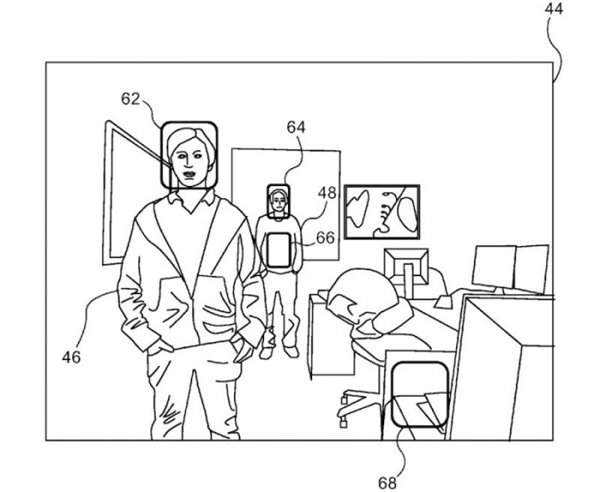
While the system is able to recognize faces in general, it lacks the ability to identify individual differences between faces, so this isn't a bio-recognition solution in itself, but it could become a crucial enabling step in a wider authentication system.
Apple is said to be developing a "revolutionary" front-facing camera system for the upcoming "iPhone 8". The technology is rumored to consist of three modules to enable fully-featured 3D sensing capabilities. While there's no way to know for sure if this particular patent describes one of those modules, the upgraded camera system is said to be fueled by PrimeSense algorithms.
Source: macrumors










