 NEWS
NEWS
iPhone Users Who Pay for iCloud Storage Get Two New Perks on iOS 27
 07/03/2026
 1357
1357
If you pay for certain iCloud+ storage plans beyond the 5GB that Apple offers for free, you will receive two more perks on iOS 27 at no additional cost.

A summary of the two new iCloud+ perks on iOS 27:
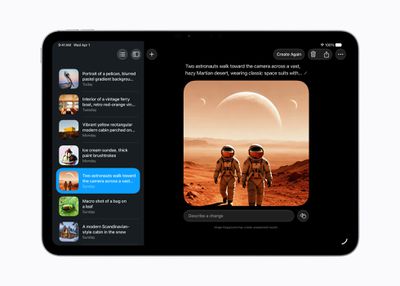
- Increased daily usage limits for some new Apple Intelligence features, including image generation in the revamped Image Playground app.
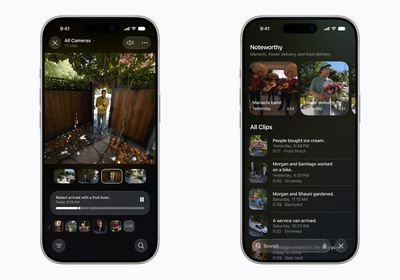
- HomeKit Secure Video cameras receive generated video descriptions, search for camera clips, and automatic surfacing of noteworthy clips.
More details about each benefit are outlined below.
First, Apple said there will be daily usage limits for some of the new and enhanced Apple Intelligence features on iOS 27, including image generation. However, the company noted that "increased access" is available with "most" iCloud+ storage plans, which presumably means every plan except the base 50GB tier for $0.99 per month.
Apple said the limits are in place because the new features rely on "powerful server models," which are undoubtedly more expensive to run.
The underlying models that power Apple Intelligence are now based on Google's Gemini models, and this has resulted in improved Apple Intelligence features. Starting with iOS 27, for example, Apple's Image Playground app can generate "photorealistic" images. Apple has not disclosed the exact daily limits for image generation.
Second, Apple said at least some iCloud+ plans will now include Apple Intelligence features for compatible smart home cameras in Apple's Home app. These new features for HomeKit Secure Video cameras include generated video descriptions, the ability to search through camera clips, and automatic surfacing of noteworthy clips.
These perks will likely require an iCloud+ plan with at least 200GB of storage for $2.99 per month. If you have an Apple One Family ($25.95 per month) or Apple One Premier ($37.95 per month) plan, you should get these benefits too.
Source: Macrumors










