 NEWS
NEWS
Apple Seeds New watchOS 27 Beta for Apple Watch Ultra 3
 06/26/2026
 955
955
Apple today seeded a new beta of watchOS 27 for the Apple Watch Ultra 3, with the update coming over two weeks after the launch of the first beta. This beta is only available for the Apple Watch Ultra 3, which did not get the second beta update that came out earlier this week.
The beta can be downloaded through the Watch app on the iPhone with a free developer account. The Apple Watch will need to be on the charger, connected to Wi-Fi, and have a battery level of 50 percent or above for new software to be installed.
watchOS 27 will include Siri AI, the smarter, more capable version of Siri. Siri can hold back-and-forth conversations, plus it has access to general world knowledge and your personal data to answer questions and find information. Siri AI on Apple Watch requires an iPhone that supports Apple Intelligence, including the iPhone 15 Pro and later.
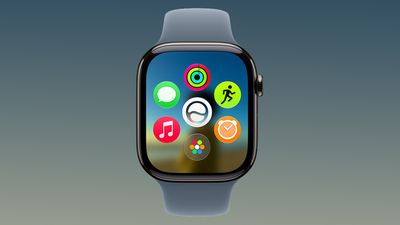
There's a new Dynamic app grid that highlights Siri suggested apps, and more intuitive Smart Stack Suggestions. You can find your parked car, see pinned messages, get noise alerts, and view identity and transit cards.
Liquid Glass has been updated to improve legibility, and Workout Buddy works on the Apple Watch even when an iPhone isn't nearby. Workout Buddy also gains new metrics like progressive increases to distance, pace, or duration. Apple added a new all-in-one Find My app with support for Precision Finding, and there are performance optimizations that improve battery life.
More on what's new in watchOS 27 is available in our watchOS 27 roundup.
Source: Macrumors










