NEWS

Apple Just Added New Accessories, Including Thinnest-Ever PopSockets

06/17/2026

27

 Apple Just Added New Accessories, Including Thinnest-Ever PopSockets


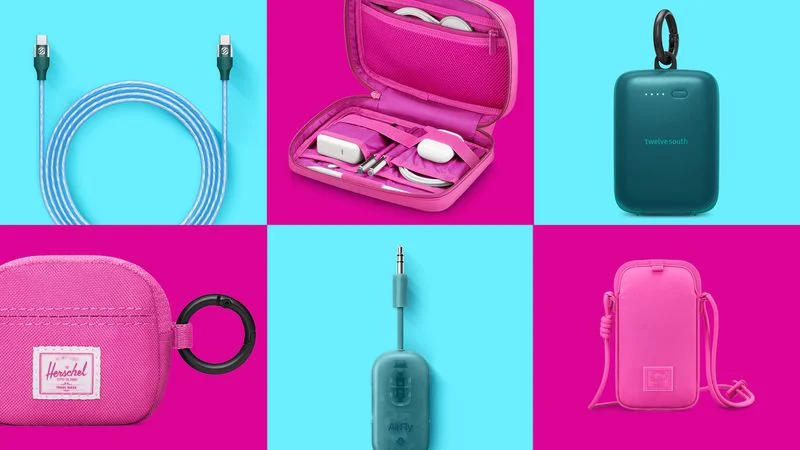
Apple has teamed up with accessory makers to offer chargers, stands, power banks, cables, and more in bright color options like blue, pink, and teal. The splash of color arrives in time for summer in the U.S. and many other countries.


The new color options are available exclusively from Apple, both online and for in-store pickup.


Notably, one of the accessories added to Apple's online store today is the PopSockets Low-Pro, which is the thinnest version of the popular accessory ever. Priced at $39.95 in the U.S., the MagSafe-compatible accessory continues to function as both an iPhone grip and a stand, except this version has a thickness of just 2.5mm.


Other participating brands include Belkin, Herschel, Mophie, Nimble, Scosche, and Twelve South.


Here are some examples:


  • Mophie Knit Puck for AirTag
  • Twelve South PowerClip Power Bank & Charger
  • Herschel AirTag Charm
  • Nimble SharePower Portable Battery Charger
  • Scosche StrikeLine USB-C to USB-C Cable (1 m)
  • Herschel Cloudform Burrard Organizer Tech
  • Belkin UltraCharge Pro 20K Power Bank with Integrated Cable
  • Twelve South AirFly Pro 2 Bluetooth Transmitter
  • Herschel Cloud Sling for iPhone


Apple also began selling some other accessories through its online store that are not part of this seasonal color refresh, including Logitech's MX Master 4 mouse, Nimble's Podium 3-in-1 wireless charger, Twelve South's PowerBug charger (with Qi 2.2 support), and more, with all of the latest additions listed on Apple's New Product Arrivals page.


Source: Macrumors

Windows
Mac OS
iOS
Linux
3uTools
Win 64-bit For this device
V9.06 2026-04-09
Download
Win 32-bit For this device
V9.06 2026-04-09
Download
3uTools
Intel Chip How to Identify Chip Type
V9.03 2026-03-27
Download
Apple Silicon
V9.03 2026-03-27
Download
How to Identify Chip Type
1.  Click the Apple icon in the top-left corner of the screen and select About This Mac.
2.  Check the Processor or Chip field to determine if it is "Intel" or "Apple".
Please use the 3uTools PC client to install the iOS client:
1、 Install either the Windows or Mac version of 3uTools on your computer
2、 Open the PC client and connect your device to the computer via USB cable
3、 After the connection is successful, wait for the computer to automatically install the mobile app for the device, or locate “Install Mobile App” on the computer and manually click to install.
3uTools
deb file
V9.01 2026-05-28
Download
rpm file
V9.01 2026-05-28
Download
Windows
Windows
iOS
iOS
Android
Android
TV
TV
3uAirPlayer
Win 64-bit For this device
V6.0.5 2026-04-23
Download
Win 32-bit For this device
V6.0.5 2026-04-23
Download
iOS Device Mirroring (No App Required)
1、 Install 3uAirPlayer on the Windows PC
2、 Open Control Center and select Screen Mirroring
3、 From the list, choose your PC to start mirroring
4、 Or connect your iOS device to the PC via USB to begin mirroring
Scan to get "3uAirPlayer" App
3uAirPlayer TV V1.0.18
2025-11-28
TV System Requirements: Android 7.0 or later
Download the TV installation package, copy it to a USB drive, insert it into your TV or set-top box, then select the file from the home screen to install.