 NEWS
NEWS
Apple Seemingly Discontinuing Vision Pro Travel Case Around the World
 06/11/2026
 615
615
Apple appears to be quietly discontinuing the Vision Pro Travel Case in international markets, with the $199 accessory removed from storefronts across much of the world.
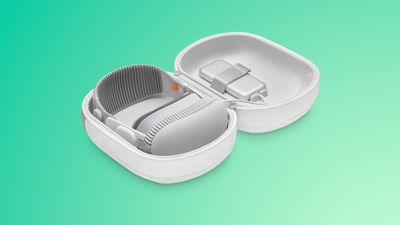
MacRumors can confirm that the Apple Vision Pro Travel Case is no longer listed on Apple's online storefronts around the world, including the UK, Japan, Germany, France, Ireland, and Hong Kong. The Apple Vision Pro accessories page in these countries no longer list the Travel Case at all, and the product web pages that once contained it have been completely removed, which would indicate discontinuation with no plans to revive the product, at least in these countries.
In China and Australia, the listings remain live and visible but the product is grayed out and unavailable to purchase. The case continues to be sold as usual in the U.S., Canada, and the UAE. It is unclear when the changes were made, but they appear to have taken place recently.
The Belkin Travel Bag for Apple Vision Pro remains available for customers in international markets as an alternative. Apple has not announced any changes to the original product's availability.
The move comes as Apple appears to have scaled back its Vision Pro ambitions. The headset's October 2025 M5 refresh reportedly failed to revive meaningful consumer interest, with the $3,499 price tag remaining unchanged despite the chip upgrade. Apple is believed to have sold around 600,000 Vision Pro units in total, and sources have noted an unusually high rate of returns compared to any other recent Apple product.
Following the M5 model's weak reception, the Vision Pro team was reportedly disbanded and its members redistributed across other projects. Vision Products Group chief Mike Rockwell has been leading Apple's Siri team since March 2025. Plans for a cheaper, lighter "Vision Air" were reportedly scrapped in October 2025, and Bloomberg's Mark Gurman said that if a new headset does eventually materialize, he would not expect it for "around two more years at least," given that the bulk of Apple's mixed-reality hardware talent have been moved to other projects.
Supply chain analyst Ming-Chi Kuo reported this month that incoming Apple CEO John Ternus signed off on canceling both a second Vision Pro and the Vision Air, with Apple's focus now shifted to smart glasses. Kuo says two products remain in development: AI-equipped glasses to rival Meta's Ray-Bans, expected in 2027, and a display-equipped set of AR glasses unlikely to arrive before 2029. Gurman separately indicated that a slimmer, cheaper Vision Pro remains a possibility in the long term, but is unlikely to arrive before late 2028 or 2029 at the earliest.
Whether it signals a complete discontinuation or simply a quiet inventory wind-down, it is difficult to not see the apparent phasing out of the Vision Pro Travel Case as part of the device's uncertain future.
Source: Macrumors










