
NEWS

Missing From Apple's Announcements: iPad 12 With Apple Intelligence

03/06/2026

21

In his newsletter over the weekend, Bloomberg's Mark Gurman said Apple was likely to announce at least some but possibly not all of the following products between March 2 and March 4: the iPhone 17e, MacBook Pros, MacBook Airs, updated entry-level iPad and iPad Air models, and a lower-cost MacBook with an iPhone chip.
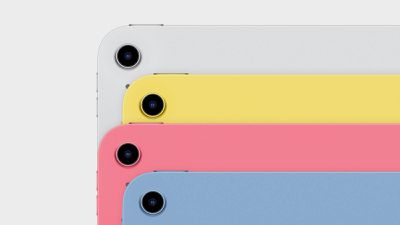
Missing From Apple's Announcements: iPad 12 With Apple Intelligence
As it turns out, Apple announced nearly all of those products, with the sole exception being an updated entry-level iPad. In fact, we got two more products on top, in the form of an updated Studio Display and a higher-end Studio Display XDR.

Apple is not expected to unveil any additional products this week, so the wait for an iPad 12 continues for now. The device is expected to have two key upgrades over the iPad 11, including a faster A18 chip and Apple Intelligence support. In fact, one rumor claimed that the iPad 12 might even be powered by Apple's latest A19 chip.

No other major changes have been rumored so far for the iPad 12, so we expect the device to have the same overall design as the current model.

Apple Intelligence is already available on all other current-generation iPad models, including the iPad mini, iPad Air, and iPad Pro.

Apple released the iPad 11 with an A16 chip in March 2025, with U.S. pricing starting at $349.

Source: Macrumors

Windows
Mac OS
iOS
Linux
3uTools
Win 64-bit For this device
V9.02 2026-02-10
Download
Win 32-bit For this device
V9.02 2026-02-10
Download
3uTools
Intel Chip How to Identify Chip Type
V9.01 2025-12-31
Download
Apple Silicon
V9.01 2025-12-31
Download
How to Identify Chip Type
1.  Click the Apple icon in the top-left corner of the screen and select About This Mac.
2.  Check the Processor or Chip field to determine if it is "Intel" or "Apple".
Please use the 3uTools PC client to install the iOS client:
1、 Install either the Windows or Mac version of 3uTools on your computer
2、 Open the PC client and connect your device to the computer via USB cable
3、 After the connection is successful, wait for the computer to automatically install the mobile app for the device, or locate “Install Mobile App” on the computer and manually click to install.
3uTools
deb file
V3.01 2025-11-20
Download
rpm file
V3.01 2025-11-20
Download
Windows
Windows
iOS
iOS
Android
Android
TV
TV
3uAirPlayer
Win 64-bit For this device
V6.0.2 2025-11-19
Download
Win 32-bit For this device
V6.0.2 2025-11-19
Download
iOS Device Mirroring (No App Required)
1、 Install 3uAirPlayer on the Windows PC
2、 Open Control Center and select Screen Mirroring
3、 From the list, choose your PC to start mirroring
4、 Or connect your iOS device to the PC via USB to begin mirroring
Scan to get "3uAirPlayer" App
3uAirPlayer TV V1.0.18
2025-11-28
TV System Requirements: Android 7.0 or later
Download the TV installation package, copy it to a USB drive, insert it into your TV or set-top box, then select the file from the home screen to install.




