
NEWS

Apple Releases iPhone Cases, Apple Watch Bands, and Crossbody Strap in New Colors

03/03/2026

181

A seasonal color refresh arrived today for a variety of Apple accessories, including iPhone cases, Apple Watch bands, and the Crossbody Strap. All of the accessories in the latest colors are available to order on Apple.com starting today.
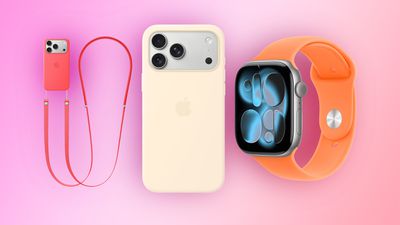
Apple Releases iPhone Cases, Apple Watch Bands, and Crossbody Strap in New Colors
Apple's Silicone Case for the standard iPhone 17 model has three new color options, including Bright Guava, Vanilla, and Electric Lavender.

Bright Guava and Vanilla extend to the Silicone Case for iPhone 17 Pro and iPhone 17 Pro Max, but the Pro models did not get Electric Lavender treatment.

Apple has a Silicone Case for the new iPhone 17e too, and it comes in Bright Guava, Vanilla, Soft Pink, and a handful of other colors.

Apple also has a MagSafe Clear Case for the iPhone 17e.

If you prefer an iPhone 17e case from Apple's Beats brand, there is a new MagSafe case with hard plastic. It comes in Bedrock Blue and Lime Stone.

As for Apple Watch bands, the Sport Band now comes in Bright Guava, Clementine, and Soft Pink, while the Sport Loop gained Bright Guava, Blue Mist, and Cantaloupe options. There are also some new colors for luxury Apple Watch Hermès bands.

Finally, the Crossbody Strap is now available in Bright Guava and Soft Pink. The accessory attaches to select Apple cases, allowing you to wear your iPhone.

For everything new, head to Apple's store page for new accessories.

Source: Macrumors

Windows
Mac OS
iOS
Linux
3uTools
Win 64-bit For this device
V9.02 2026-02-10
Download
Win 32-bit For this device
V9.02 2026-02-10
Download
3uTools
Intel Chip How to Identify Chip Type
V9.01 2025-12-31
Download
Apple Silicon
V9.01 2025-12-31
Download
How to Identify Chip Type
1.  Click the Apple icon in the top-left corner of the screen and select About This Mac.
2.  Check the Processor or Chip field to determine if it is "Intel" or "Apple".
Please use the 3uTools PC client to install the iOS client:
1、 Install either the Windows or Mac version of 3uTools on your computer
2、 Open the PC client and connect your device to the computer via USB cable
3、 After the connection is successful, wait for the computer to automatically install the mobile app for the device, or locate “Install Mobile App” on the computer and manually click to install.
3uTools
deb file
V3.01 2025-11-20
Download
rpm file
V3.01 2025-11-20
Download
Windows
Windows
iOS
iOS
Android
Android
TV
TV
3uAirPlayer
Win 64-bit For this device
V6.0.2 2025-11-19
Download
Win 32-bit For this device
V6.0.2 2025-11-19
Download
iOS Device Mirroring (No App Required)
1、 Install 3uAirPlayer on the Windows PC
2、 Open Control Center and select Screen Mirroring
3、 From the list, choose your PC to start mirroring
4、 Or connect your iOS device to the PC via USB to begin mirroring
Scan to get "3uAirPlayer" App
3uAirPlayer TV V1.0.18
2025-11-28
TV System Requirements: Android 7.0 or later
Download the TV installation package, copy it to a USB drive, insert it into your TV or set-top box, then select the file from the home screen to install.




