
NEWS

Duolingo Used iPhone's Dynamic Island to Display Ads, Violating Apple Design Guidelines

01/04/2026

160

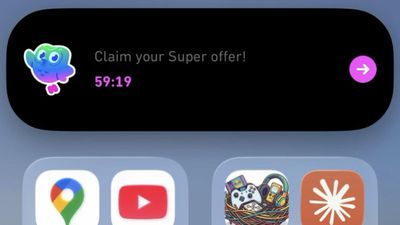
Language learning app Duolingo has apparently been using the iPhone's Live Activity feature to display ads on the Lock Screen and the Dynamic Island, which violates Apple's design guidelines.
Duolingo Used iPhone's Dynamic Island to Display Ads, Violating Apple Design Guidelines
According to multiple reports on Reddit, the Duolingo app has been displaying an ad for a "Super offer," which is Duolingo's paid subscription option.

Apple's guidelines for Live Activity state that the feature cannot be used to display ads or promotions. From Apple's developer website:

Don't use a Live Activity to display ads or promotions. Live Activities help people stay informed about ongoing events and tasks, so it's important to display only information that's related to those events and tasks.

Apps that violate Apple's interface guidelines can be pulled from the App Store.

We were not able to replicate the Live Activity ad, so it's possible that Duolingo stopped displaying it after user complaints.


Source: Macrumors

Windows
Mac OS
iOS
Linux
3uTools
Win 64-bit For this device
V9.01 2025-12-27
Download
Win 32-bit For this device
V9.01 2025-12-27
Download
3uTools
Intel Chip How to Identify Chip Type
V9.01 2025-12-31
Download
Apple Silicon
V9.01 2025-12-31
Download
How to Identify Chip Type
1.  Click the Apple icon in the top-left corner of the screen and select About This Mac.
2.  Check the Processor or Chip field to determine if it is "Intel" or "Apple".
Please use the 3uTools PC client to install the iOS client:
1、 Install either the Windows or Mac version of 3uTools on your computer
2、 Open the PC client and connect your device to the computer via USB cable
3、 After the connection is successful, wait for the computer to automatically install the mobile app for the device, or locate “Install Mobile App” on the computer and manually click to install.
3uTools
deb file
V3.01 2025-11-20
Download
rpm file
V3.01 2025-11-20
Download
Windows
Windows
iOS
iOS
Android
Android
TV
TV
3uAirPlayer
Win 64-bit For this device
V6.0.2 2025-11-19
Download
Win 32-bit For this device
V6.0.2 2025-11-19
Download
iOS Device Mirroring (No App Required)
1、 Install 3uAirPlayer on the Windows PC
2、 Open Control Center and select Screen Mirroring
3、 From the list, choose your PC to start mirroring
4、 Or connect your iOS device to the PC via USB to begin mirroring
Scan to get "3uAirPlayer" App
3uAirPlayer TV V1.0.18
2025-11-28
TV System Requirements: Android 7.0 or later
Download the TV installation package, copy it to a USB drive, insert it into your TV or set-top box, then select the file from the home screen to install.




