
NEWS

Apple Plans to Expand iPhone Driver's Licenses to These 7 U.S. States

12/26/2025

29

In select U.S. states, residents can add their driver's license or state ID to the Apple Wallet app on the iPhone and Apple Watch, and then use it to display proof of identity or age at select airports and businesses, and in select apps.
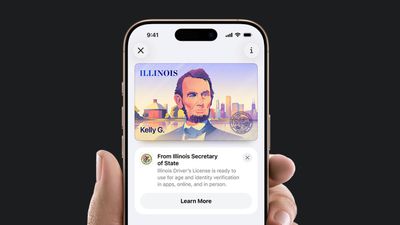
Apple Plans to Expand iPhone Driver's Licenses to These 7 U.S. States
The feature is currently available in 13 U.S. states and Puerto Rico, and it is expected to launch in at least seven more in the future.

To set up the feature, open the Wallet app and tap on the plus sign in the top-right corner. Next, select Driver's License and ID Cards and follow the steps.

Supported States

The following 13 states offer driver's licenses in the Wallet app:

  • Arizona (since March 2022)
  • Maryland (since May 2022)
  • Colorado (since November 2022)
  • Georgia (since May 2023)
  • Ohio (since July 2024)
  • Hawaii (since August 2024)
  • California (since September 2024)
  • Iowa (since October 2024)
  • New Mexico (since December 2024)
  • Montana (since August 2025)
  • North Dakota (since September 2025)
  • West Virginia (since October 2025)
  • Illinois (since November 2025)

The feature is also available in Puerto Rico.

Future States

Apple and local DMV offices have announced that the following U.S. states have signed on to adopt the feature, but no timeframes were disclosed:

  • Connecticut
  • Kentucky
  • Mississippi
  • Oklahoma
  • Utah
  • Arkansas
  • Virginia

Source: Macrumors

Windows
Mac OS
iOS
Linux
3uTools
Win 64-bit For this device
V9.0 2025-11-11
Download
Win 32-bit For this device
V9.0 2025-11-11
Download
3uTools
Intel Chip How to Identify Chip Type
V9.0 2025-12-02
Download
Apple Silicon
V9.0 2025-12-02
Download
How to Identify Chip Type
1.  Click the Apple icon in the top-left corner of the screen and select About This Mac.
2.  Check the Processor or Chip field to determine if it is "Intel" or "Apple".
Please use the 3uTools PC client to install the iOS client:
1、 Install either the Windows or Mac version of 3uTools on your computer
2、 Open the PC client and connect your device to the computer via USB cable
3、 After the connection is successful, wait for the computer to automatically install the mobile app for the device, or locate “Install Mobile App” on the computer and manually click to install.
3uTools
deb file
V3.01 2025-11-20
Download
rpm file
V3.01 2025-11-20
Download
Windows
Windows
iOS
iOS
Android
Android
TV
TV
3uAirPlayer
Win 64-bit For this device
V6.0.2 2025-11-19
Download
Win 32-bit For this device
V6.0.2 2025-11-19
Download
iOS Device Mirroring (No App Required)
1、 Install 3uAirPlayer on the Windows PC
2、 Open Control Center and select Screen Mirroring
3、 From the list, choose your PC to start mirroring
4、 Or connect your iOS device to the PC via USB to begin mirroring
Scan to get "3uAirPlayer" App
3uAirPlayer TV V1.0.18
2025-11-28
TV System Requirements: Android 7.0 or later
Download the TV installation package, copy it to a USB drive, insert it into your TV or set-top box, then select the file from the home screen to install.




