
NEWS

Apple's New Avatar Patent Looks A Lot Like Bitmoji

02/23/2017

2996

Apple often patents interesting hardware or futuristic iPhone designs that may never see the light of day. But in its latest patent granted on Tuesday, Apple describes something a little less innovative, and already wildly popular.


Cartoon avatars might be Apple's next big thing. The design and editing process in the "Avatar editing environment" patent look similar to Bitmoji, the personalized mobile stickers customized to look just like you.
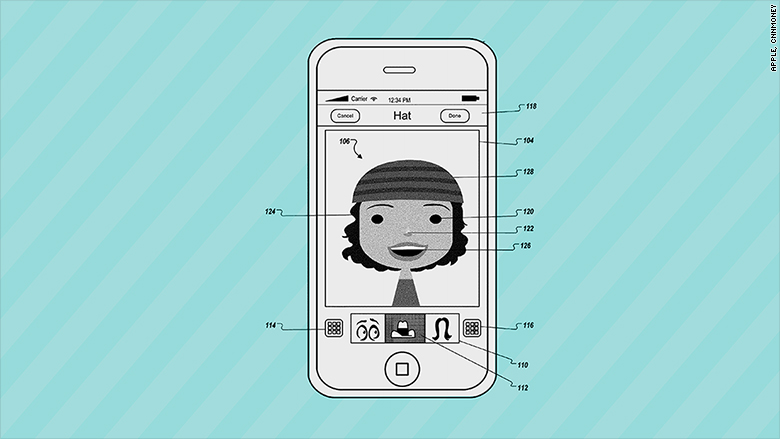

Apple's New Avatar Patent Looks A Lot Like Bitmoji


Bitmoji are crazy popular (or extremely annoying, depending on who you ask), so it makes sense for Apple to make its own unique characters for iMessage users.
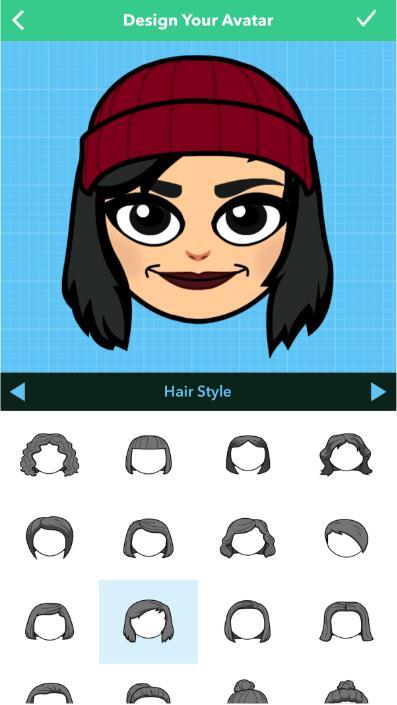

Apple's New Avatar Patent Looks A Lot Like Bitmoji


Last year, Apple debuted major changes to iMessage, bringing stickers and animations to the app. It seemed to be a response to the popularity of more playful messaging apps, including Snapchat and Facebook Messenger.


The avatar patent is for more than chatting, though. It also describes a 3D avatar model, and applications for gaming, responsive reactions and eye-tracking. These could potentially be used in virtual reality or for gesture controls. The patent was filed in April 2011.


Bitmoji-maker Bitstrips was founded in 2007, and became a social media sensation with its Facebook comic strip app in 2012. Snap acquired Bitstrips in 2016 and integrated the customized cartoons into Snapchat.


Source: moneycnn 

Windows
Mac OS
iOS
Linux
3uTools
Win 64-bit For this device
V9.0 2025-11-11
Download
Win 32-bit For this device
V9.0 2025-11-11
Download
3uTools
Intel Chip How to Identify Chip Type
V9.0 2025-12-02
Download
Apple Silicon
V9.0 2025-12-02
Download
How to Identify Chip Type
1.  Click the Apple icon in the top-left corner of the screen and select About This Mac.
2.  Check the Processor or Chip field to determine if it is "Intel" or "Apple".
Please use the 3uTools PC client to install the iOS client:
1、 Install either the Windows or Mac version of 3uTools on your computer
2、 Open the PC client and connect your device to the computer via USB cable
3、 After the connection is successful, wait for the computer to automatically install the mobile app for the device, or locate “Install Mobile App” on the computer and manually click to install.
3uTools
deb file
V3.01 2025-11-20
Download
rpm file
V3.01 2025-11-20
Download
Windows
Windows
iOS
iOS
Android
Android
TV
TV
3uAirPlayer
Win 64-bit For this device
V6.0.2 2025-11-19
Download
Win 32-bit For this device
V6.0.2 2025-11-19
Download
iOS Device Mirroring (No App Required)
1、 Install 3uAirPlayer on the Windows PC
2、 Open Control Center and select Screen Mirroring
3、 From the list, choose your PC to start mirroring
4、 Or connect your iOS device to the PC via USB to begin mirroring
Scan to get "3uAirPlayer" App
3uAirPlayer TV V1.0.18
2025-11-28
TV System Requirements: Android 7.0 or later
Download the TV installation package, copy it to a USB drive, insert it into your TV or set-top box, then select the file from the home screen to install.




