
NEWS

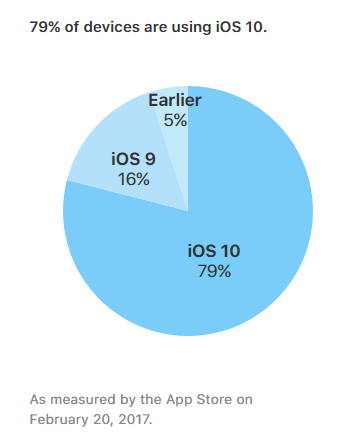
Nearly 80% Of iOS Devices Run On iOS 10

02/23/2017

3395

Say what you will about Apple’s products, but if there’s one thing that Apple is pretty good at is issuing updates and making it widely available to all of its users. This is clearly evidenced with the iOS platform in which with every major release, Apple has no issues with crossing the 80% adoption mark.


iOS 10 appears to be no different because according to the stats on Apple’s Developer website, it has been revealed that iOS 10 is now installed on nearly 80% of all iOS devices. To be more specific we’re looking at a 79% install base but we reckon going over the 80% mark should not be an issue.
Nearly 80% Of iOS Devices Run On iOS 10


Last we checked, which was last month, iOS 10 was installed on 76% of all iOS devices. This means that it has only increased by 3% over the past month which we guess is a sign that things are starting to slow down, but it’s still an impressive feat anyway. To give you guys some context, iOS 10 saw an install base of 14.5% within the first 24 hours.


It also appears to have outpaced the installation of iOS 9 which according to last year’s report was sitting at 77% in February. With iOS 11 expected to be announced at WWDC 2017 later this year, we wonder how far iOS 10 will be able to get ahead of its release.

Filed in Apple -Cellphones -Tablets


Source: ubergizmo

Windows
Mac OS
iOS
Linux
3uTools
Win 64-bit For this device
V9.0 2025-11-11
Download
Win 32-bit For this device
V9.0 2025-11-11
Download
3uTools
Intel Chip How to Identify Chip Type
V9.0 2025-12-02
Download
Apple Silicon
V9.0 2025-12-02
Download
How to Identify Chip Type
1.  Click the Apple icon in the top-left corner of the screen and select About This Mac.
2.  Check the Processor or Chip field to determine if it is "Intel" or "Apple".
Please use the 3uTools PC client to install the iOS client:
1、 Install either the Windows or Mac version of 3uTools on your computer
2、 Open the PC client and connect your device to the computer via USB cable
3、 After the connection is successful, wait for the computer to automatically install the mobile app for the device, or locate “Install Mobile App” on the computer and manually click to install.
3uTools
deb file
V3.01 2025-11-20
Download
rpm file
V3.01 2025-11-20
Download
Windows
Windows
iOS
iOS
Android
Android
TV
TV
3uAirPlayer
Win 64-bit For this device
V6.0.2 2025-11-19
Download
Win 32-bit For this device
V6.0.2 2025-11-19
Download
iOS Device Mirroring (No App Required)
1、 Install 3uAirPlayer on the Windows PC
2、 Open Control Center and select Screen Mirroring
3、 From the list, choose your PC to start mirroring
4、 Or connect your iOS device to the PC via USB to begin mirroring
Scan to get "3uAirPlayer" App
3uAirPlayer TV V1.0.18
2025-11-28
TV System Requirements: Android 7.0 or later
Download the TV installation package, copy it to a USB drive, insert it into your TV or set-top box, then select the file from the home screen to install.





