 NEWS
NEWS
Apple Almost Built A Futuristic Cybercafe in 1997 With Computers at Every Table
 02/14/2017
 3989
3989
Around the time former Apple CEO Steve Jobs returned to Apple in 1997, the company considered building an "Apple Cafe," a fanciful, futuristic cybercafe where people could gather to eat, do business, and use Apple computers. The idea was created in partnership with Mega Bytes, with Apple planning to license its name and brand.
Former Disney Imagineer and Landmark Entertainment Group founder Tony Christopher was tasked with coming up with a design for the concept, and in a new interview with Fast Company, he shared images of what the cafe might have looked like and the story behind its conceptualization.
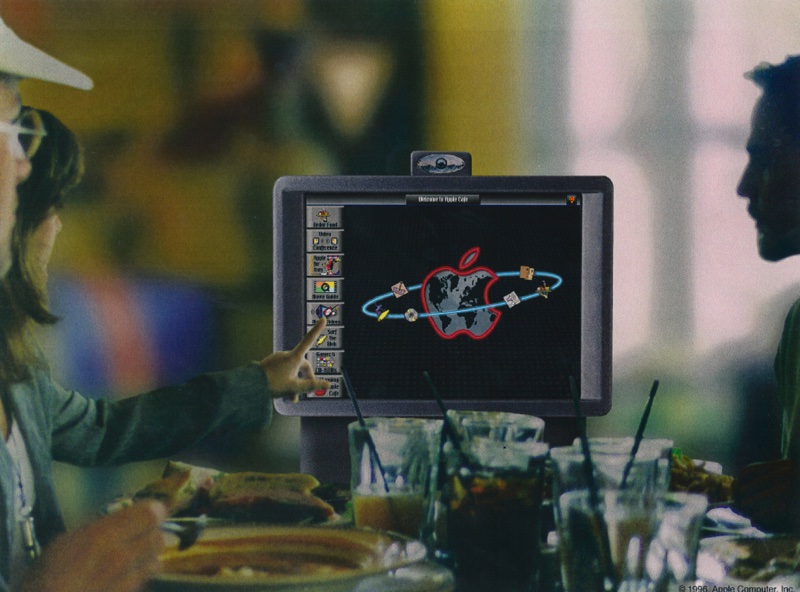
Jobs was reportedly involved in the design process, choosing Christopher's team because of their work creating unique retail spaces. Jobs wanted a way for Apple to connect to customers, which led to the idea of a cafe equipped with Apple products. A computer was at every table, where people could do things like order food, watch movies, surf the web, design web pages, and play video games.
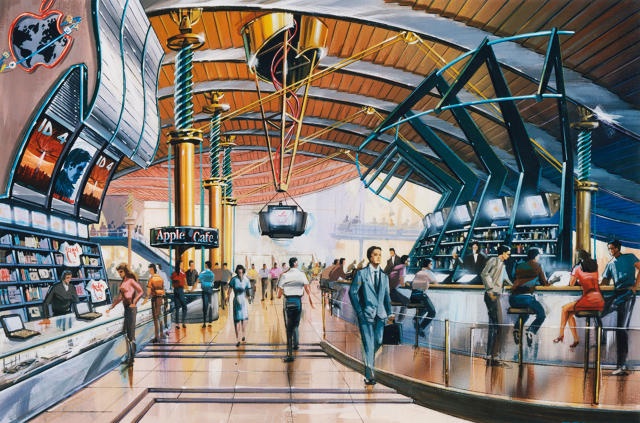
A predecessor to the Apple retail stores we know today, the cafe was also meant to sell Apple products to consumers. The images don't resemble the clean, simple design of Apple Stores today, but the central idea - connecting with customers - inspired both the cafe and Apple's eventual line of retail stores. The interior design was very high tech, and we worked on it for about six months. I think we were trying to create sort of a modern-but-futuristic look, which is different than the immersive theme park stuff we do: castles and dinosaurs. I remember the designers we put on it were the high-tech, future-thinking guys. We understood that we were dealing with a computer, which was a future technology not a historic technology, and the Apple Cafe had to reflect that. Apple's original plan was to build a flagship Apple Cafe in Los Angeles and then expand them around the world. Apple was far enough along in the design process that there was a website promoting the Apple Cafe, and planned openings in Paris, London, New York, Tokyo, and Sydney, but the stores never materialized.
While Christopher says the idea was sidelined in favor of Jobs' plan for an "Apple Store," press information released by Apple at the time said Apple's business partners had pulled back. From 1997: "We think it's a great project, and we'd like to move forward," said a spokeswoman for Landmark Entertainment, which was to design the cafes. Spokespeople for Mega Bytes International, a U.K-based real estate company, could not be reached for comment. The Apple spokeswoman said the concept of launching the cafes remains a possibility down the road. "If somebody approaches us again, we'll be happy to consider it," she said. "It just didn't work out with this group in particular."
The first Apple Store eventually opened in 2001 under the leadership of Ron Johnson. Over the last 16 years, Apple Stores have expanded to more than 20 countries, with Apple operating 491 stores around the world.
Source: macrumors










