 NEWS
NEWS
Apple Revenue Hits An All-time High In Its Fiscal First Quarter
 02/01/2017
 4024
4024
Apple released its fiscal 2017 first-quarter financial results today. Over the holiday season, the company raked in $78.3 billion, up 3% from this time last year, and it made $23.4 billion on that take, slightly less than the $24.2 billion it made this time last year. Apple claims that revenue figure is an all-time record, and it also reported an all-time earnings-per-share record of $3.36 for the quarter. Gross margin rang in at 38.5%, down slighly from the 40% figure from this time last year.
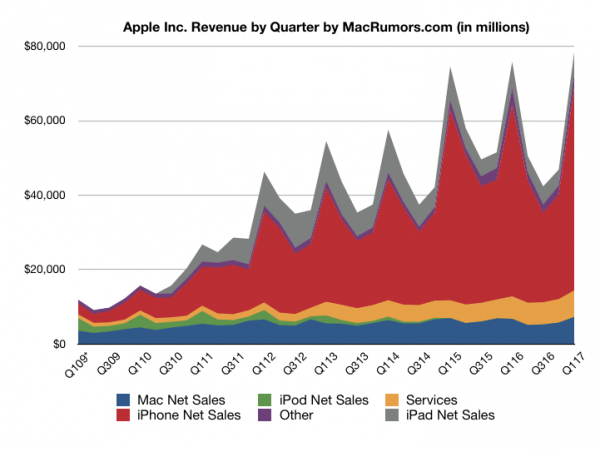
Those record numbers rode in on the back of 78.3 million iPhones sold, a 5% increase over this time last year. Apple made $54.4 billion off its phone business, also up 5% from this time last year. iPad sales continue to decline, however. The company moved 13 million of its slates last quarter, down 19% from a year ago, and it took in $5.5 billion from those sales, a 22% decline. Mac sales more or less held steady at 5.4 million, a 1% increase in units sold, and those sales took in another $7.2 billion for the company.
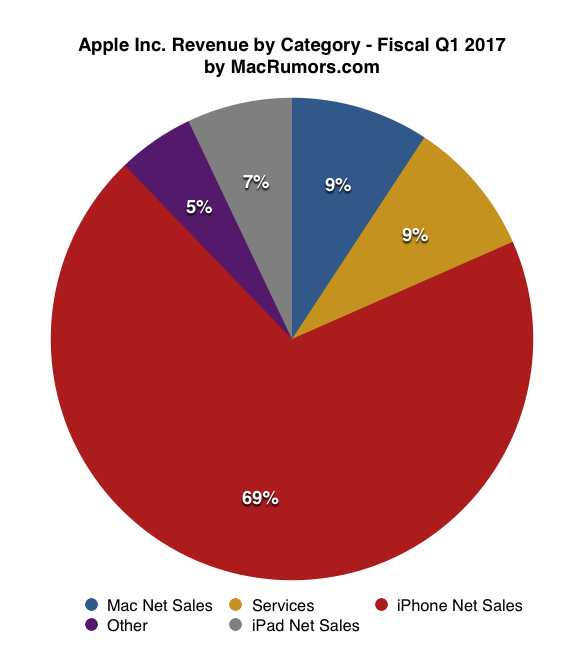
Apple's services business continues to enjoy healthy growth. All told, that division took in $7.1 billion in revenue, up 18% from this time last year. Meanwhile, the Other Products catch-all scraped up $4 billion, down 8% from this time last year. CEO Tim Cook says the Apple Watch set a revenue record last quarter, but it apparently wasn't enough to buoy the S.S. Other Products.
For its next quarter, Apple expects to take in $51.5 billion to $53.5 billion in revenue and produce gross margins of 38% to 39%.
Source: techreport










