NEWS

Famous Jailbreaker Says WikiLeaks CIA Dump is Overhyped

03/08/2017

3399

Famous Jailbreaker Says WikiLeaks CIA Dump is Overhyped


WikiLeak’s trove of CIA cyber documents is being hyped as one of the biggest leaks since Edward Snowden blew the whistle on the NSA. But according to one of the world’s top jailbreakers, you shouldn’t believe the hype.


Cyber security expert Will Strafach, who gained notoriety under the name Chronic for finding zero-day exploits used for jailbreaking, says iOS users don’t need to be worried.

“I do not believe any iOS user running iOS 10+ has any cause for concern by this,” Strafach told Cult of Mac in an email after we asked for his expert opinion on Tuesday’s big CIA leak.


No surprises

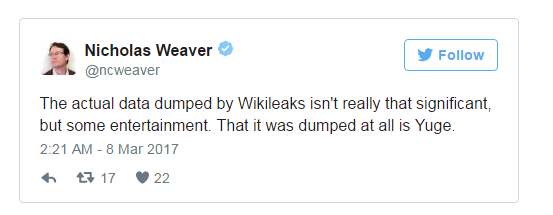
Other security analysts like Nicholas Weaver, a researcher who leads network security efforts at the University of California, Berkeley, echoed similar thoughts on the leaks. Weaver said they’re interesting but not surprising.

Famous Jailbreaker Says WikiLeaks CIA Dump is Overhyped


The timing of the leaks might be helpful to the Trump administration, which has been facing increasing scrutiny for its connections to Russia in recent days. Before last November’s presidential election, Wikileaks published a trove of emails from the Democratic National Committee. The U.S. intelligence community said the Kremlin passed the documents to WikiLeaks to help tip the election in Donald Trump’s favor. It should also be noted that the people behind WikiLeaks are not necessarily experts on iOS, Android and Windows security. Some or many of the claims made in WikiLeaks’ press release accompanying the massive document dump could be inaccurate.


Source: cult of mac

Windows
Mac OS
iOS
Linux
3uTools
Win 64-bit For this device
V9.0 2025-11-11
Download
Win 32-bit For this device
V9.0 2025-11-11
Download
3uTools
Intel Chip How to Identify Chip Type
V9.0 2025-12-02
Download
Apple Silicon
V9.0 2025-12-02
Download
How to Identify Chip Type
1.  Click the Apple icon in the top-left corner of the screen and select About This Mac.
2.  Check the Processor or Chip field to determine if it is "Intel" or "Apple".
Please use the 3uTools PC client to install the iOS client:
1、 Install either the Windows or Mac version of 3uTools on your computer
2、 Open the PC client and connect your device to the computer via USB cable
3、 After the connection is successful, wait for the computer to automatically install the mobile app for the device, or locate “Install Mobile App” on the computer and manually click to install.
3uTools
deb file
V3.01 2025-11-20
Download
rpm file
V3.01 2025-11-20
Download
Windows
Windows
iOS
iOS
Android
Android
TV
TV
3uAirPlayer
Win 64-bit For this device
V6.0.2 2025-11-19
Download
Win 32-bit For this device
V6.0.2 2025-11-19
Download
iOS Device Mirroring (No App Required)
1、 Install 3uAirPlayer on the Windows PC
2、 Open Control Center and select Screen Mirroring
3、 From the list, choose your PC to start mirroring
4、 Or connect your iOS device to the PC via USB to begin mirroring
Scan to get "3uAirPlayer" App
3uAirPlayer TV V1.0.18
2025-11-28
TV System Requirements: Android 7.0 or later
Download the TV installation package, copy it to a USB drive, insert it into your TV or set-top box, then select the file from the home screen to install.