
TUTORIALS

How to Jailbreak iOS 9.2 - 9.3.3 Using 3uTools?

09/19/2024

17905

One of the important features of 3uTools is support for jailbreaking iOS 9 and iOS 10, this tutorial aims to help our users know how to jailbreak iOS 9.2 - 9.3.3 using 3uTools? If you want to jailbreak iOS 10.0-10.2, you can click here.


Notice:


1. Please backup your data of iDevice with 3uTools before jailbreaking.


2. This jailbreak supports iOS 9.2-9.3.3 iDevice which compatible with 64bit. 


3. Please ensure your iDevice has sufficient battery and connects with the network. 


4. This is a Semi-Untethered Jailbreak. If you reboot your iDevice, you may not be able to run any Cydia jailbreak apps, and even some stock apps. Cydia and jailbreak apps will crash.


Compatible Modes:


  iPhone: iPhone 5s, iPhone 6, iPhone 6 Plus, iPhone 6s, iPhone 6s Plus, iPhone SE


  iPad: iPad mini 2, iPad mini 3, iPad mini 4, iPad Air, iPad Air 2, iPad Pro


  iPod: iPad Touch 6G


Jailbreak Processes


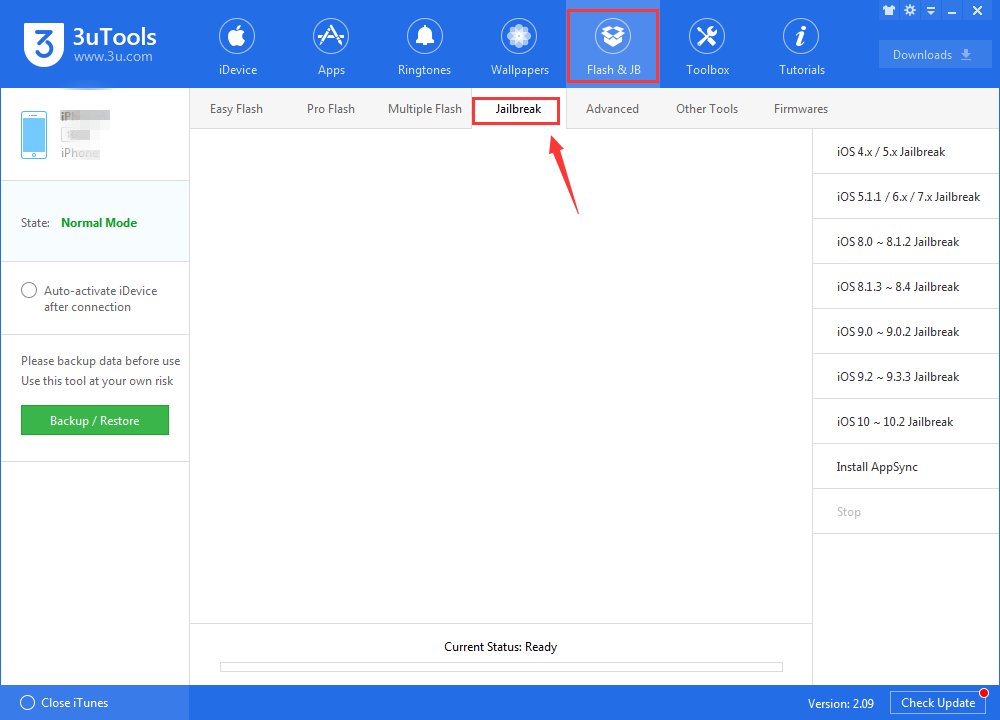
Step1: Launch 3uTools on a PC. Connect your iDevice to PC using the USB cable. Click Flash & JB -- Jailbreak.
 

How to Jailbreak iOS 9.2 - 9.3.3 Using 3uTools?


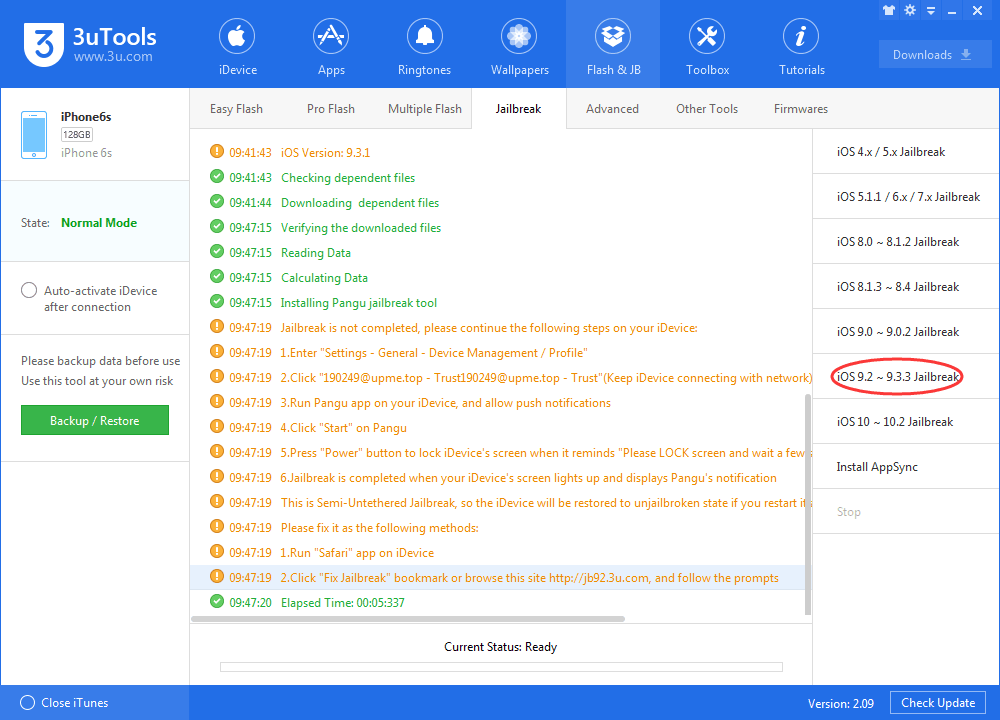
Step2: Click "iOS 9.2 -- 9.3.3 jailbreak" on this interface. And follow up the prompts.
 

How to Jailbreak iOS 9.2 - 9.3.3 Using 3uTools?


Step3: You need to operate your iDevice now: find "Settings"--"General"--"Device Management", click "641729@6xxx.win" and choose "Trust". (Please keep your iDevice connecting with network).
 

How to Jailbreak iOS 9.2 - 9.3.3 Using 3uTools?


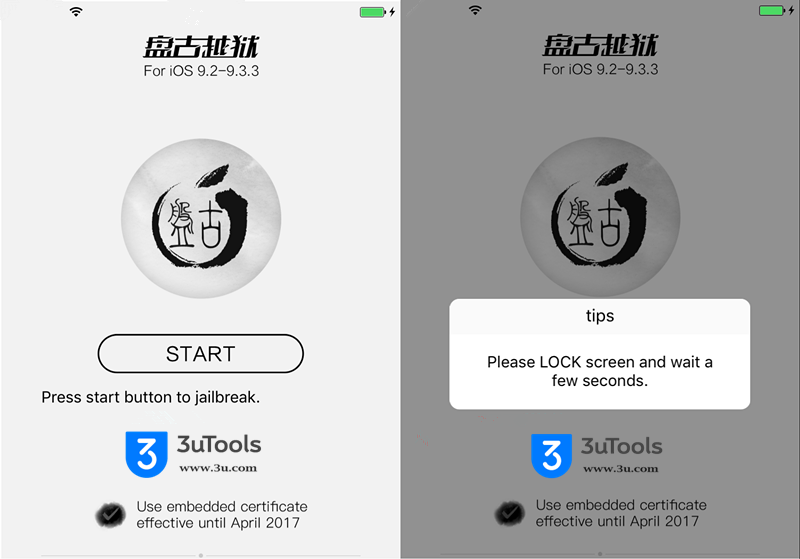
Step4: You can back to lockscreen page, then open Pangu app, and choose "OK" when you received a notification of Pangu.


Step5: Click "Start" button in Pangu, hold Power Button to lock your screen and wait for a moment.


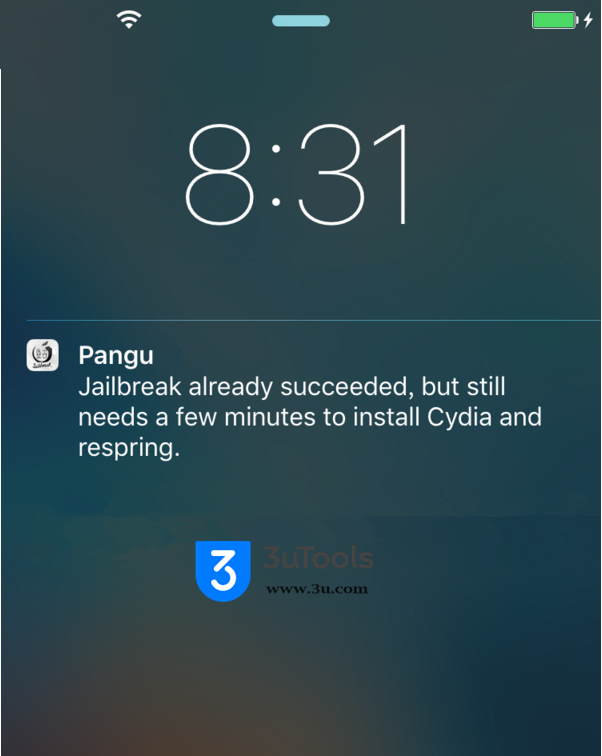
Step6: When your screen is lighted up as below that's meaning jailbreak was succeeded, it needs to respring and install Cydia for a few minutes.

 

How to Jailbreak iOS 9.2 - 9.3.3 Using 3uTools?

Windows
Mac OS
iOS
Linux
3uTools
Win 64-bit For this device
V9.01 2025-12-27
Download
Win 32-bit For this device
V9.01 2025-12-27
Download
3uTools
Intel Chip How to Identify Chip Type
V9.01 2025-12-31
Download
Apple Silicon
V9.01 2025-12-31
Download
How to Identify Chip Type
1.  Click the Apple icon in the top-left corner of the screen and select About This Mac.
2.  Check the Processor or Chip field to determine if it is "Intel" or "Apple".
Please use the 3uTools PC client to install the iOS client:
1、 Install either the Windows or Mac version of 3uTools on your computer
2、 Open the PC client and connect your device to the computer via USB cable
3、 After the connection is successful, wait for the computer to automatically install the mobile app for the device, or locate “Install Mobile App” on the computer and manually click to install.
3uTools
deb file
V3.01 2025-11-20
Download
rpm file
V3.01 2025-11-20
Download
Windows
Windows
iOS
iOS
Android
Android
TV
TV
3uAirPlayer
Win 64-bit For this device
V6.0.2 2025-11-19
Download
Win 32-bit For this device
V6.0.2 2025-11-19
Download
iOS Device Mirroring (No App Required)
1、 Install 3uAirPlayer on the Windows PC
2、 Open Control Center and select Screen Mirroring
3、 From the list, choose your PC to start mirroring
4、 Or connect your iOS device to the PC via USB to begin mirroring
Scan to get "3uAirPlayer" App
3uAirPlayer TV V1.0.18
2025-11-28
TV System Requirements: Android 7.0 or later
Download the TV installation package, copy it to a USB drive, insert it into your TV or set-top box, then select the file from the home screen to install.




