
NEWS

Apple Shares Worksheet With 30 iPad Activities for Kids

04/10/2020

2988

Apple's education team today debuted 30 activities for kids and families to do as part of an ongoing effort to support at-home learning while many schoolchildren are completing classes remotely.
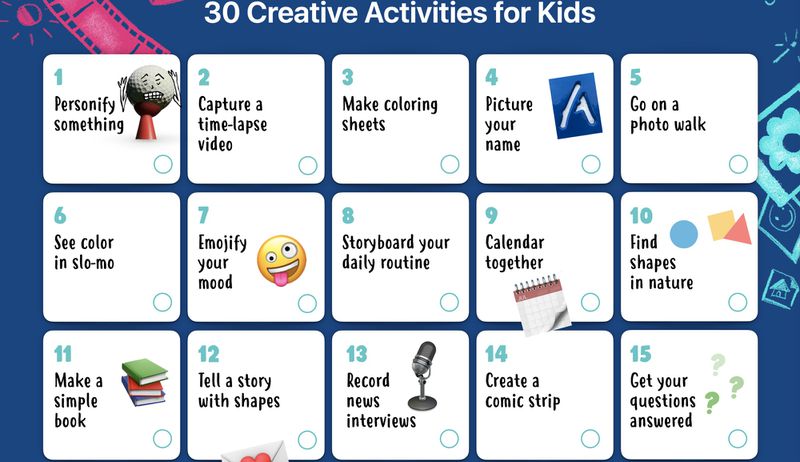
Apple Shares Worksheet With 30 iPad Activities for Kids
Available as a PDF that can be downloaded or printed, the suggestions include a wide range of activities that can be done using the built-in features of an iPad or iPhone.


Some of the activities include capturing a time-lapse video, going on a photo walk, recording a news interview, personalizing a portrait, seeing color in slo-mo video, and emojifying a mood. The PDF features a different activity for each number, each of which can be clicked for an activity description. For the photo walk activity, for example: Pick a color or letter of the day and take photos around the house and yard of things that are that color or start with that letter. Then put them together in a collage or video. Try to make a rainbow or complete the alphabet!


According to Apple, these activities are aimed at children from pre-kindergarten to second grade, but can be tailored to suit the whole family.


Apple has also been supporting at-home education with a series of remote learning videos that are designed to help schools and educators use the built-in features of their devices to enable remote learning.


Source: 9to5mac

Windows
Mac OS
iOS
Linux
3uTools
Win 64-bit For this device
V9.0 2025-11-11
Download
Win 32-bit For this device
V9.0 2025-11-11
Download
3uTools
Intel Chip How to Identify Chip Type
V9.0 2025-12-02
Download
Apple Chip
V9.0 2025-12-02
Download
How to Identify Chip Type
1.  Click the Apple icon in the top-left corner of the screen and select About This Mac.
2.  Check the Processor or Chip field to determine if it is "Intel" or "Apple".
Please use the 3uTools PC client to install the iOS client:
1、 Install either the Windows or Mac version of 3uTools on your computer
2、 Open the PC client and connect your device to the computer via USB cable
3、 After the connection is successful, wait for the computer to automatically install the mobile app for the device, or locate “Install Mobile App” on the computer and manually click to install.
3uTools
deb file
V3.01 2025-11-20
Download
rpm file
V3.01 2025-11-20
Download
Windows
Windows
iOS
iOS
Android
Android
TV
TV
3uAirPlayer
Win 64-bit For this device
V6.0.2 2025-11-19
Download
Win 32-bit For this device
V6.0.2 2025-11-19
Download
iOS Device Mirroring (No App Required)
1、 Install 3uAirPlayer on the Windows PC
2、 Open Control Center and select Screen Mirroring
3、 From the list, choose your PC to start mirroring
4、 Or connect your iOS device to the PC via USB to begin mirroring
Scan to get "3uAirPlayer" App
3uAirPlayer TV V1.0.18
2025-11-28
TV System Requirements: Android 7.0 or later
Download the TV installation package, copy it to a USB drive, insert it into your TV or set-top box, then select the file from the home screen to install.




