
NEWS

Apple's HomePod Still has a Long Way to go

02/11/2020

2685

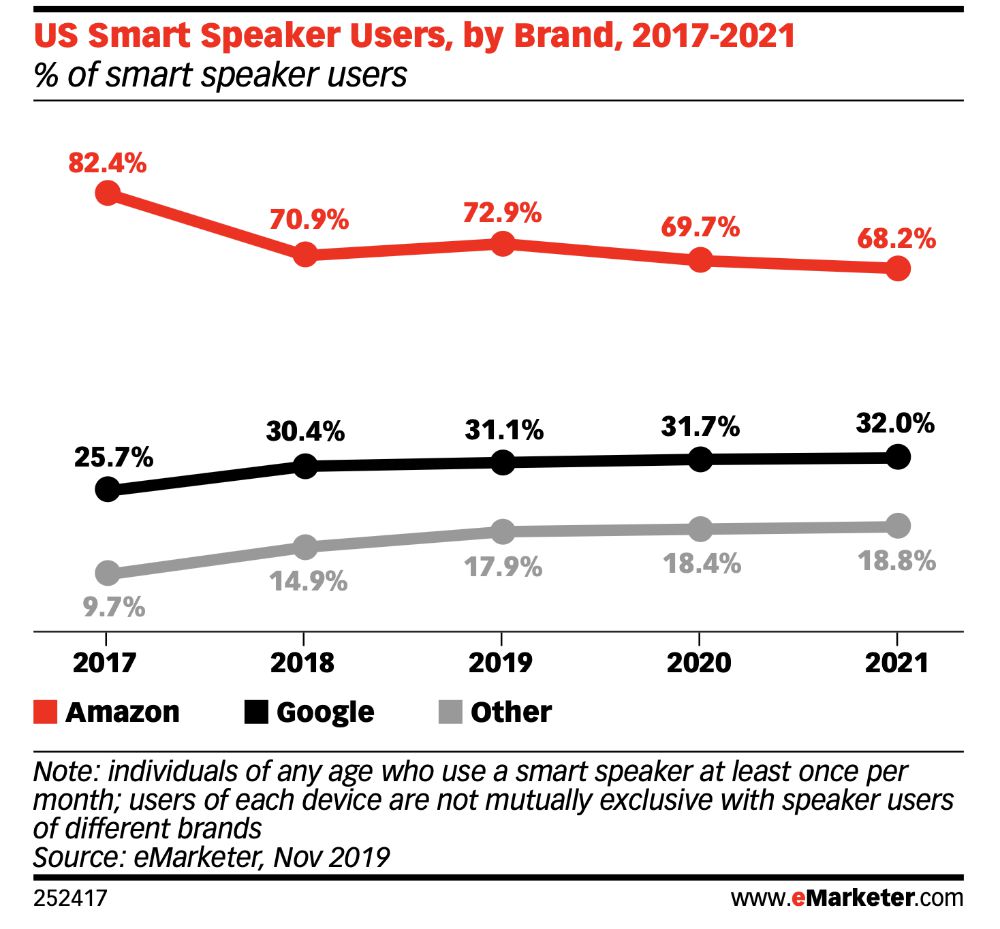
Amazon, which already holds a dominant position in the U.S. smart speaker market, will continue to maintain this leadership through 2021, with approximately 70% of total U.S. smart speaker users expected to use an Amazon Echo device, according to a new report from eMarketer. 

Apple's HomePod Still has a Long Way to go


The analyst firm estimates Amazon will easily hold onto its top spot through 2021, when nearly 70% of total U.S. smart speaker owners will continue to use an Amazon Echo device. Specifically, 69.7% of U.S. smart speaker users will use an Echo in 2020, down slightly from 72.9% last year. In 2021, the number will drop a bit further, with then 68.2% of U.S. smart speaker owners using an Echo device.


Meanwhile, 31.7% of smart speaker owners in 2020 will use a Google-branded device, and only 18.4% will use some other brand —such as Apple's HomePod, Sonos One or Harmon Kardon Invoke, for example. (The percentages total more than 100% because some smart speaker owners do own more than one brand, eMarketer notes.)


Apple's HomePod accounted for just 5% of the estimated 76 million smart speaker installed base in the U.S. in the second quarter of 2019, according to August 2019 data shared today by Consumer Intelligence Research Partners (CIRP). That’s the latest HomePod percentage estimate I can find.


Source: Apple world. Today

Windows
Mac OS
iOS
Linux
3uTools
Win 64-bit For this device
V9.0 2025-11-11
Download
Win 32-bit For this device
V9.0 2025-11-11
Download
3uTools
Intel Chip How to Identify Chip Type
V9.0 2025-12-02
Download
Apple Chip
V9.0 2025-12-02
Download
How to Identify Chip Type
1.  Click the Apple icon in the top-left corner of the screen and select About This Mac.
2.  Check the Processor or Chip field to determine if it is "Intel" or "Apple".
Please use the 3uTools PC client to install the iOS client:
1、 Install either the Windows or Mac version of 3uTools on your computer
2、 Open the PC client and connect your device to the computer via USB cable
3、 After the connection is successful, wait for the computer to automatically install the mobile app for the device, or locate “Install Mobile App” on the computer and manually click to install.
3uTools
deb file
V3.01 2025-11-20
Download
rpm file
V3.01 2025-11-20
Download
Windows
Windows
iOS
iOS
Android
Android
TV
TV
3uAirPlayer
Win 64-bit For this device
V6.0.2 2025-11-19
Download
Win 32-bit For this device
V6.0.2 2025-11-19
Download
iOS Device Mirroring (No App Required)
1、 Install 3uAirPlayer on the Windows PC
2、 Open Control Center and select Screen Mirroring
3、 From the list, choose your PC to start mirroring
4、 Or connect your iOS device to the PC via USB to begin mirroring
Scan to get "3uAirPlayer" App
3uAirPlayer TV V1.0.18
2025-11-28
TV System Requirements: Android 7.0 or later
Download the TV installation package, copy it to a USB drive, insert it into your TV or set-top box, then select the file from the home screen to install.




